Comparisons
Best AI meeting note-taker in 2026
The best tool isn't the one that records. It's the one you actually use afterwards.
Log in
Last updated April 2026
Every AI meeting note-taker records your calls, transcribes the audio, and generates a summary. That's table stakes. The question that matters is what happens next. Does the transcript sit in a silo? Does it connect to the document you discussed? Can you find what someone said three months ago without scrolling through an archive? Can you ask the AI a question that spans your meetings and your files?
Here are five tools worth evaluating.
They're ordered by how much they do beyond the transcript.
Quick comparison
Pricing | Free (limited), Business $14/user/mo | Free (unlimited recordings, 5 AI summaries/mo), Premium $20/mo, Team $19/user/mo, Business $34/user/mo | Free (300 min/mo), Pro $16.99/mo, Business $30/mo | Free (limited), Pro $18/mo, Business $29/mo | |
Bot-free | Yes. Real-time transcription, no participant joins | Yes. System audio capture | Recently added bot-free option. Historically visible bot | Bot on Zoom/Teams. No-bot Chrome extension for Google Meet only | No. Visible bot joins all calls |
Live transcript during call | Yes. Read the transcript as the conversation happens | No. Notes enhanced after the call | No | Yes. Real-time transcript visible during call | No. Transcript available after |
Merge notes with transcript | Yes. Smart meeting notes combine your notes with the conversation transcript | Yes. Hybrid human-AI format: your keywords enhanced by the transcript | No | No | No |
Stop/resume transcription | Yes. Pause and resume during a call | No | No | No | No |
Regenerate write-up | Yes. Regenerate the AI summary after the meeting | No | No | No | No |
Audio file | Yes. Keeps the original audio | Yes | Yes | Yes | Yes |
AI scope | Your entire library: meetings, files, documents, images, video, everything | Meeting transcripts and folders | Meeting transcripts. Ask Fathom for cross-meeting Q&A | Meeting transcripts | Meeting transcripts. AskFred for Q&A |
AI credits | No credit system | No credit system | No credit system | No credit system | 20-30 credits/mo. Heavy users pay for top-ups |
Search | Semantic, visual, colour, inside-document, inside-video, cross-platform | Across meeting notes | Across meeting transcripts | Across transcripts | Across transcripts with topic trackers |
Content beyond meetings | Full workspace: file storage, notes, PDFs, images, video, audio, tasks, spatial canvas, publishing | None | None | None | None |
Collaboration | Real-time co-editing, annotations, comments, chat, shared drives | Team folders | Share clips and transcripts | Share transcripts, team chat channels | Share transcripts, comment on moments |
Publishing | One-click with analytics, password protection, stakeholder links | None | None | None | None |
CRM integration | No native CRM | No native CRM | HubSpot, Salesforce on Business | Salesforce (Enterprise) | Salesforce, HubSpot on Pro+ |
Platforms | Web, iOS, Android, desktop, Chrome extension | Desktop (Mac, Windows), iOS. No Android, no web app | Web, desktop, iOS, Android | Web, iOS, Android, Chrome extension | Web, iOS, Android, Chrome extension |
Fabric
Fabric isn't just a meeting note-taker. It's an AI workspace where meetings are one type of content alongside everything else you save: documents, research, images, video, tasks, published work. But its meeting features are worth evaluating on their own.
What makes it different:
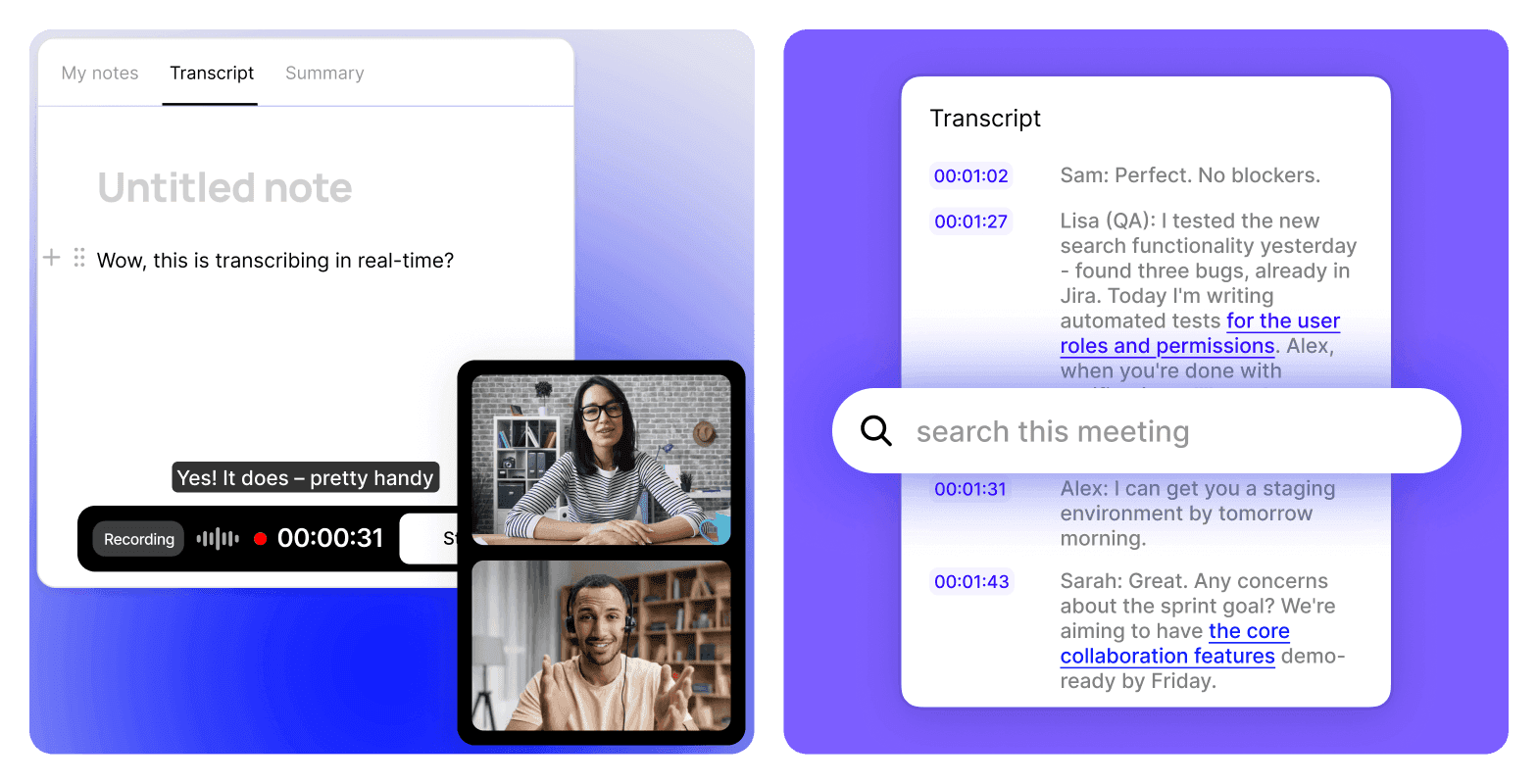
Fabric shows you the live transcript during the call. You can read what was just said while the conversation is still happening. Smart meeting notes merge your own notes with the transcript, so the output isn't generic AI slop. It's your thinking, enriched by what was actually said. You can stop and resume transcription mid-call if parts of the conversation are off the record. You can regenerate the write-up after the meeting if the first summary doesn't capture what mattered. And the original audio file is always available.
No bot joins the call. Real-time transcription with automatic meeting detection. No participant notification.
Where it goes further:
The meeting transcript lives alongside everything else in your library. The AI understands your meetings and your documents and your saved research. You can ask a question that spans all of it. Semantic search finds moments inside meetings by meaning. Publishing with analytics lets you share meeting summaries with stakeholders and see who viewed them. Collaboration tools let your team annotate, comment, and co-edit alongside the notes.
Where it sits:
Fabric is the right choice if meetings are part of a broader workflow and you want the notes connected to everything else. If you just want a standalone meeting recorder and nothing else, the dedicated tools below are simpler.
Granola
Granola is a dedicated meeting notes app with a specific workflow: you jot keywords and headings during the call, then the AI enhances them with the full transcript afterwards. Your notes appear in black. AI-generated content appears in grey. The result feels personal rather than machine-generated.
What it does well:
The hybrid human-AI format is Granola's defining feature. Bot-free capture via system audio. No participant notification. The output reads like your notes, expanded by the AI. Team features with Spaces and folders. MCP server for connecting meeting context to other tools.
Where it stops:
No live transcript during the call. No stop/resume. No regeneration of write-ups. No file storage, no search beyond meetings, no publishing, no collaboration beyond sharing summaries. Desktop app required (Mac, Windows). iOS for phone calls only. No Android. No web app. Meetings are the whole product.
Best for:
People who want polished meeting notes that feel like their own, and who don't need the notes connected to anything else.
Fathom
Fathom is a meeting recorder with a generous free tier: unlimited recordings and transcripts with no storage limit. AI summaries are capped at 5 per month on the free plan. Business adds CRM sync and coaching scorecards.
What it does well:
The free plan is genuinely useful for archiving calls. Ask Fathom provides cross-meeting Q&A on paid plans. CRM field sync on Business for sales workflows. Coaching metrics and scorecards for sales managers. Bot-free option recently added.
Where it stops:
No live transcript during the call. No note merging. No stop/resume. No content beyond meeting transcripts. No file storage, no publishing, no spatial canvas, no collaboration beyond sharing clips. The upper tiers ($25-34/user/month) are expensive for a meeting-only tool.
Best for:
Solo users who want free unlimited meeting recordings, and sales teams that need CRM sync with coaching analytics.
Otter.ai
Otter is one of the older players in meeting transcription. It shows a live transcript during calls, which is useful for following along in real time.
What it does well:
Real-time transcript visible during the call. This is genuinely helpful for catching something you missed or verifying what was just said. Team chat channels around meeting content. Reasonable starting price on the annual Pro plan.
Where it stops:
The bot joins calls on Zoom and Teams as a visible participant. No-bot option exists only for Google Meet via Chrome extension. Minute caps: 300/month free, 1,200/month Pro (reduced from 6,000 without a price cut). File imports capped at 10/month on Pro. No note merging, no stop/resume, no content beyond transcripts. English, French, and Spanish only.
Best for:
People who value the live transcript during calls and are primarily on Google Meet where the no-bot option works.
Fireflies.ai
Fireflies is a meeting transcription tool with conversation intelligence features on higher tiers and CRM integrations for sales workflows.
What it does well:
100+ language support. CRM sync with Salesforce and HubSpot on Pro and above. Conversation intelligence with talk-time analysis on Business. Topic trackers for searching across transcripts.
Where it stops:
A visible bot joins every call. No bot-free option. AI features run on credits (20-30/month depending on plan). When credits run out, features pause or you buy top-ups. No live transcript during the call. No note merging, no stop/resume. No content beyond transcripts. Security concerns have been raised publicly, including a December 2025 class action lawsuit (Cruz v. Fireflies.AI Corp.) alleging biometric data collection without consent.
Best for:
Sales teams that need CRM sync and conversation intelligence, and who work in 100+ languages.
How to choose
If meetings are part of a broader workflow and you want the notes connected to your documents, research, files, and tasks, with AI that understands all of it: Fabric. It's the only tool here that's also a workspace.
If you want polished meeting notes that feel like yours and meetings are a standalone need: Granola. The hybrid human-AI format is its strength.
If you want free unlimited recording and meetings are an archive you search occasionally: Fathom's free tier handles that.
If you need CRM sync for sales with conversation intelligence: Fathom Business or Fireflies Business, depending on whether you can live with a visible bot.
If you want a live transcript during calls and don't need anything beyond meetings: Otter shows the transcript in real time. Fabric does too, and also does everything else.
What most reviews don't tell you
Most "best meeting note-taker" roundups compare transcription accuracy, pricing, and integrations. Those matter. But the real question is what happens to the meeting after it ends.
A transcript that sits in a separate app, disconnected from the document you discussed, the task you agreed on, and the research that informed the conversation, is a record. It's not knowledge.
The meeting happened. You have proof. But can you find what was said six months from now by describing the topic?
Can you ask the AI a question that spans the meeting and the contract it was about?
Can the notes connect to the follow-up you wrote and the deliverable you published?
Most meeting tools stop at the transcript. Fabric starts there.
FAQs
Can Fabric read the transcript while the meeting is still happening?
Yes. Fabric shows the live transcript during the call. You can follow along in real time, catch things you missed, and verify what was said without waiting for the meeting to end.
Can Fabric merge my notes with the transcript?
Yes. Smart meeting notes combine your own notes with the conversation transcript. The output reflects your thinking, enriched by what was actually said.
Can I pause and resume transcription?
In Fabric, yes. You can stop and restart transcription during a call if parts of the conversation are off the record. None of the other tools in this roundup offer this.
Can I regenerate the AI summary?
In Fabric, yes. If the first write-up doesn't capture what mattered, you can regenerate it. This isn't available in the other tools listed.
Which tools are bot-free?
Fabric and Granola are fully bot-free. Fathom recently added a bot-free option. Otter is bot-free only on Google Meet via Chrome extension. Fireflies sends a visible bot to every call.
Which is cheapest?
Fathom's free plan is the most generous for raw recording: unlimited transcripts with no storage limit. AI summaries are capped at 5/month. Fabric has a free tier with limited storage and AI. Granola, Otter, and Fireflies all have limited free plans.
Which is best for sales teams?
Fathom Business ($25-34/user/month) has CRM sync, coaching scorecards, and deal views. Fireflies has CRM integration on Pro ($18/month) with conversation intelligence on Business ($29/month). Fabric doesn't have native CRM integration. For sales-specific workflows with pipeline analytics, Fathom or Fireflies are more specialised.
Do any of these keep the original audio?
A few keep the audio recording. Fabric, Fathom, Otter, and Fireflies store it in the cloud. Granola does not.
Compare similar apps and tools:
Evaluating other options? See more comparisons:



Explore more comparions:
Evaluating other options? See more comparisons: