Learn why Fabric is the best knowledge-base for developers ->

Fabric
CLI
Fabric, from your terminal.
Search your library and save to it without leaving the shell.
Built for developers, and the AI agents working alongside them.
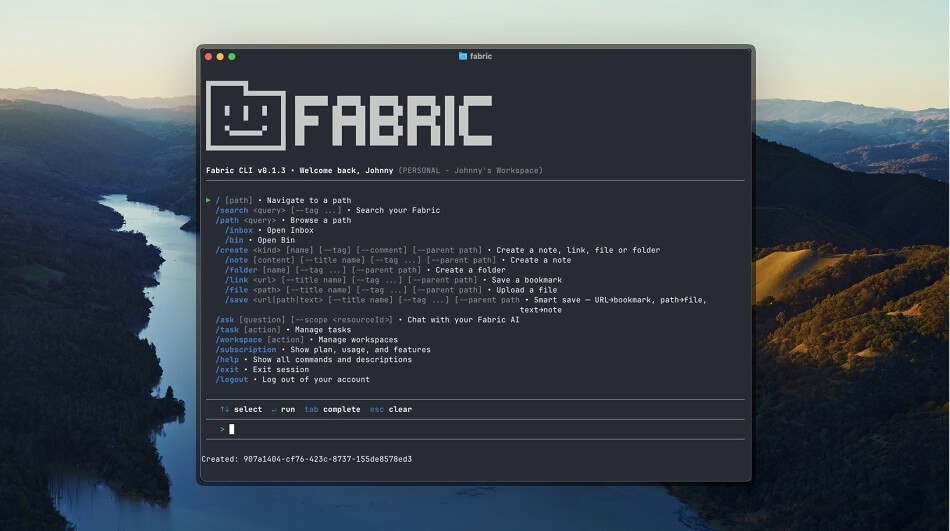

Fabric, from your terminal.
Stop tabbing out to capture an idea or dig up a file.
Your whole Fabric library, every note, doc, image and link, is one command away from wherever you're working.

Save a thought without context switching.
The best ideas tend to show up mid-task. Save them without breaking flow.
A note, a file, a chunk of output, whatever you've got, and Fabric will surface it again when you need it.
Ask Fabric without opening Fabric.
Query your whole library from the terminal.
Fabric's AI assistant works the same here as it does in the app: it can answer questions, summarize content, create notes, move files, tag things, and carry out most actions you'd normally do through the UI.
Your agent can talk directly to your Fabric workspace agent.
Find anything in 200ms.
Fabric's AI search understands what you meant, not just what you typed.
Look up that diagram you saved three months ago, the spec your teammate shared, or the screenshot with the weird error. No filenames or folders to remember.
Give your AI agent real memory.
Coding agents like Claude Code, Codex and Cursor forget between sessions, and you can't carry preferences or memory across them.
With the Fabric CLI, they don't have to.
Any agent that can run a shell command can pull context from your Fabric library at the start of a task and save what it learned at the end.
Fabric becomes persistent, searchable memory that gets smarter with every run.
Check out the other apps.
Fabric is with you on every device.



FAQs
What is the Fabric CLI?
A free command-line tool for searching your Fabric library and saving notes, files and links to it straight from the terminal.
How do I install the Fabric CLI?
Run the install script from your terminal, or grab the binary for your platform from the Fabric downloads page. No dependencies.
Is the Fabric CLI free?
Yes. It's free to use with any Fabric account, including the free plan.
Can AI agents use the Fabric CLI?
Yes. Any agent that can execute shell commands (Claude Code, Codex, aider, custom scripts) can search your Fabric library and save to it through the CLI. That gives agents persistent memory across sessions, so they can build on past work instead of starting from scratch every time.
How is the CLI different from the Fabric MCP server?
No. The CLI is standalone and talks to Fabric directly. You can run it on a headless server with no GUI at all.
Where is my data stored?
In the same Fabric library you use on web, mobile and desktop. Everything you save from the CLI is encrypted in transit and at rest, and syncs across your devices right away.