Comparisons

Best apps for gathering inspiration in 2026
Collecting inspiration is easy. Making sense of it is hard.
Log in
Last updated April 2026
You've saved hundreds of images, links, articles, and references. They're scattered across boards, folders, and browser tabs you'll never reopen. The collecting part isn't the problem. Every tool on this list handles that. The problem is what happens next: can you find that colour palette from six months ago? Can you connect a reference image to the brief it was for? Can you search your inspiration by what it looks like, not what you named it?
Here are five tools for gathering inspiration. They're ordered by how much they do after you've saved something.
Quick comparison
Pricing | Free (100 cards), Student of Life $6.99/mo, Mastermind $12.99/mo | Free (100 cards, 10 files), Professional $9.99/user/mo, Team $49/mo | Free (unlimited bookmarks), Pro ~$3.50/mo | Free (ad-supported) | |
What it is | AI workspace that understands all your content | Private AI scrapbook | Visual board for arranging ideas spatially | Bookmark manager with nested collections | Visual discovery and shopping platform |
AI | Built-in AI assistant across multiple models. Ask questions about your saved content. Contextual to your entire library | AI auto-tagging, image recognition, text extraction. No conversational AI | None | AI-suggested tags (Pro). No AI assistant | AI recommendations and visual search lens. Serves the ad algorithm, not your library |
Save from web | Chrome extension with automatic content extraction | Browser extensions, mobile share | Web clipper | Browser extensions, mobile apps, Zapier | Pin button, browser extension |
Search | Semantic, visual, colour, inside-document, inside-video, cross-platform | AI-powered search, text-in-image recognition | Basic search within boards | Full-text search across saved pages (Pro) | Visual search lens (finds products on the web, not in your library) |
Colour search | No | No | No | No | |
Visual search | Yes. Drop in an image, find similar content in your library | Visual similarity within your library | No | No | Visual search lens (finds similar products on the web) |
Content types | PDFs, images, video, audio, docs, links, ePubs, slides, spreadsheets, emails | Bookmarks, images, notes, articles, quotes, PDFs | Notes, images, links, files, to-do lists | Bookmarks, articles, images, PDFs | Pins (images and videos from the web) |
Spatial canvas | Freeform canvas with real-time multiplayer | No | Spatial boards (the whole product). Real-time collaboration | No | No |
Content understanding | Automatic extraction, enrichment, and relationship mapping | AI auto-tags and categorises. No relationship mapping | None. You arrange manually | None. You organise into collections | None. The algorithm organises for its purposes, not yours |
Collaboration | Real-time co-editing, annotations on any media, comments, chat, shared drives | None. Deliberately single-user | Real-time board editing, comments | Shared collections | Group boards, shared pins |
Publishing | One-click with analytics, password protection, stakeholder links | None | Share boards via link | Public collections | Pins are public by default |
Privacy | Private by default. AES-256 encryption, CASA Tier 2 | Private by design. No tracking, no ads | Private by default | Private by default. Public optional | Public by default. Ad-supported. Your activity feeds the algorithm |
Platforms | Web, iOS, Android, desktop, Chrome extension | Web, iOS, Android, macOS, browser extensions | Web, iOS, macOS. No Android | Web, iOS, Android, Windows, macOS, all browsers | Web, iOS, Android |
Fabric
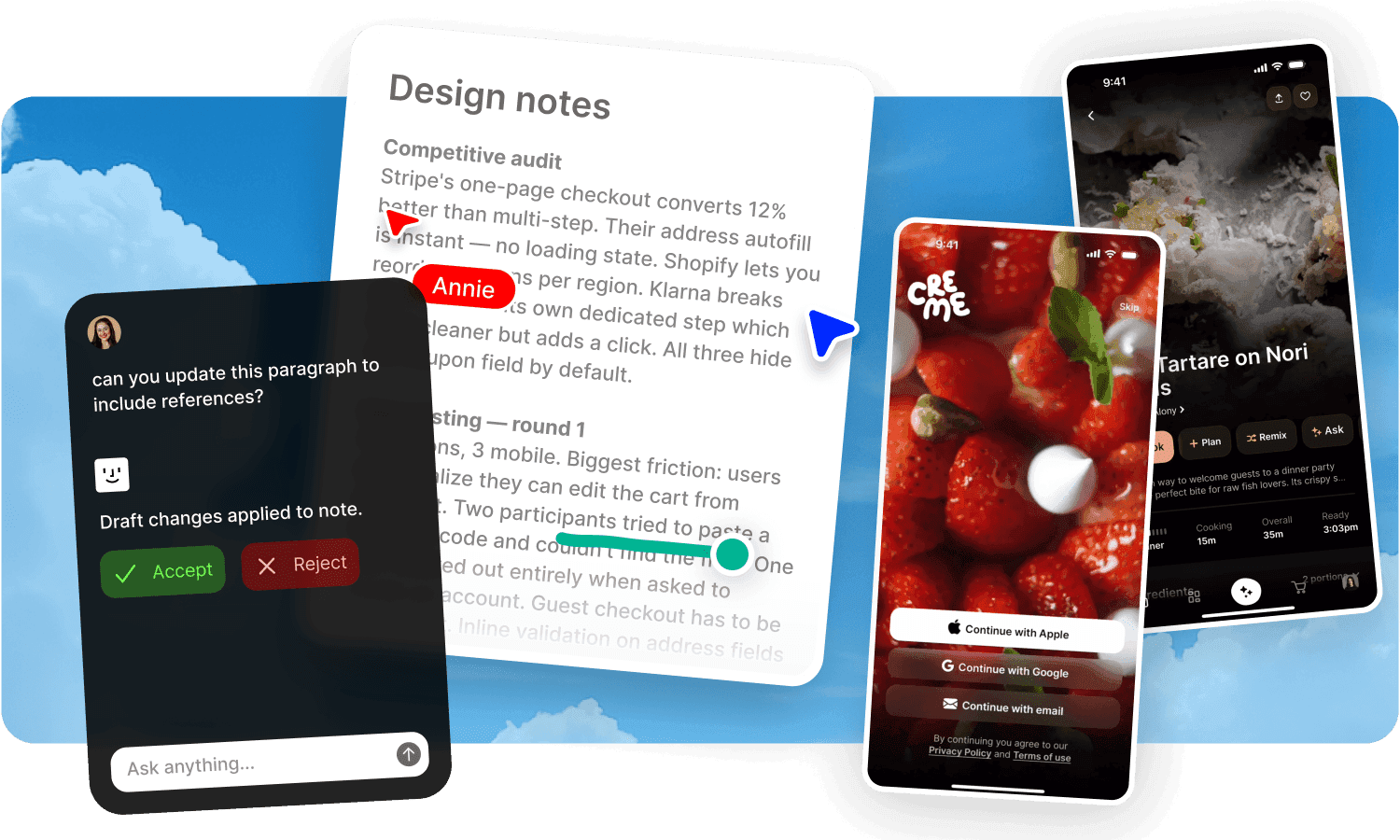
Fabric is an AI workspace where everything you save becomes part of a connected, searchable library. For gathering inspiration, it's the tool that turns a collection into something you can think with.
What makes it different: Colour search. Visual search. Semantic search. These three change the experience of finding saved inspiration. Looking for that warm terracotta palette from a project last year? Search by colour. Have a reference image and want to find similar things in your library? Drop it into visual search. Can't remember where you saw something but remember what it was about? Semantic search finds it by meaning.
Every file you save is automatically extracted, enriched, and indexed. The AI maps relationships between your saved content. You can ask questions across your entire library: "what design references have I saved that use brutalist typography?" and get results across images, PDFs, saved articles, and slides. The AI understands your inspiration, not just where you filed it.
The spatial canvas lets you pull anything from your library and arrange it freely for moodboarding, with real-time multiplayer. Annotate any content type. Leave threaded comments. Share with one click and see who viewed it.
Available on every device. Easiest to start using. No configuration.
Where it sits: Fabric is the right choice if you want your inspiration library to be searchable, connected, and useful months after you saved something. If you just need a quick visual board for a single project, the simpler tools below are faster to start with.
Mymind
Mymind is a private AI scrapbook. Save things from the web. Mymind auto-tags and categorises them. Find them later without folders or manual sorting.
What it does well: The save-and-forget philosophy is genuine. No folders, no labels, no manual organisation. AI handles everything. Text-in-image recognition is useful for screenshots and design references. The reading mode strips articles to clean text. The interface is calm and visually refined. Privacy is a core commitment: no data collection, no tracking, no ads.
Where it stops: No conversational AI. You can't ask questions about your saved content. No colour search. No collaboration. No publishing. No spatial canvas for moodboarding. No integrations, no API, no way to connect to other tools. Deliberately single-user and deliberately closed. If you want to do something with your saved inspiration beyond looking at it again, you need another tool for that.
Best for: Solo collectors who want a beautiful, private, low-effort scrapbook and don't need to collaborate, search by colour, or ask AI questions about what they've saved.
Milanote
Milanote is a visual board for arranging ideas spatially. Drag and drop images, notes, links, and files onto a canvas. Moodboards, briefs, storyboards.
What it does well: The spatial arrangement is the whole product. Place content on a board and see ideas together. Real-time collaboration. Nested boards for organising projects within projects. Clean, visual interface designed for creative work. The web clipper saves images, links, and text.
Where it stops: No AI. No semantic search. No visual or colour search. No content understanding. Finding something you saved six months ago means remembering which board it's on. Performance degrades at around 500 cards per board, 300 for image-heavy boards. No Android app. No integrations. The boards are islands. What you saved on one doesn't connect to what you saved on another.
Best for: Creative teams working on a single visual project who want a spatial canvas for arranging references. Less useful as a long-term inspiration library because there's no search by meaning and the boards don't connect.
Raindrop.io
Raindrop is a bookmark manager. Save links from the web, organise them into nested collections, tag them, find them later.
What it does well: Nested collections with drag-and-drop sorting. Full-text search across saved pages on Pro. Permanent copies of saved web pages so they survive even if the original goes down. Multiple view modes (grid, list, masonry, headlines). Open-source apps. Generous free tier with unlimited bookmarks. Cheap Pro plan (~$3.50/month). Solid for managing a large bookmark library.
Where it stops: No AI assistant. No colour or visual search. No semantic search. No content understanding. No spatial canvas. No collaboration beyond shared collections. No annotations or comments on content. Raindrop saves links. It doesn't understand what's in them or how they relate to each other.
Best for: People who primarily collect links and web content and want them organised in a clean, structured bookmark library at a low price.
Pinterest is a visual discovery platform. You browse, you pin, you scroll. 570 million people use it monthly.
What it does well: Discovery. The recommendation engine surfaces content based on your activity. Visual search lens lets you photograph something and find similar products. Infinite scroll of inspiration across every visual category. It's where many creative projects start.
Where it stops: Pinterest is a discovery platform, not a personal library. Your pins are public by default. Your activity feeds the ad algorithm. Search is designed to help you find new things on the web, not to find specific things you've saved. There's no semantic search across your pins, no colour search in your own library, no AI that understands your saved content, no collaboration beyond group boards, no annotations, no publishing with analytics. The average Pinterest board is a graveyard of good intentions. You pinned it. You'll probably never find it again.
Best for: The starting point. Browse Pinterest for discovery. But save what matters into a tool that will help you find it, understand it, and use it later.
How to choose
If you want to find your inspiration later by colour, by visual similarity, or by describing what it was about: Fabric. No other tool on this list has colour search, visual search, and semantic search together.
If you want a private scrapbook that asks nothing of you and you work alone: Mymind.
If you need a spatial canvas for a single project and the team is collaborating visually: Fabric.
If you collect links and want a cheap, clean bookmark manager: Raindrop.
If you're browsing for new ideas: Pinterest. Then save what matters somewhere you'll actually find it again (Fabric).
If you're not sure: Ask yourself this question: six months from now, will you be able to find that reference you saved today? If the answer matters, choose the tool that makes it possible.
What most "inspiration app" roundups miss
Most articles about inspiration tools compare how you save things. Web clipper, browser extension, drag and drop, mobile share. These all work. They're all fine. Saving is a solved problem.
The unsolved problem is retrieval. Finding the thing you saved. Not the thing you saved yesterday. The thing you saved in March, for a project you're not working on anymore, that's suddenly relevant again. Finding it by what it looks like, not what you called it. Finding it by describing the feeling of it, not by remembering which folder it's in.
That's the gap between a collection and a library. A collection grows until you can't find anything. A library grows and gets more useful. The difference is search. Not keyword search. Search by meaning, by colour, by visual similarity.
Most inspiration tools are collections. Fabric is a library.
FAQs
Can Fabric search by colour?
Yes. Colour search finds assets by palette across your entire library. Looking for everything you've saved in a specific shade of blue? Colour search handles that. No other tool on this list offers this.
Can I use Fabric for moodboarding?
Yes. The spatial canvas lets you place any content from your library freely, arrange it visually, and collaborate in real time. You can drag saved images, documents, links, and files onto the canvas.
Is Fabric free?
Fabric has a free tier with limited storage and AI.
Can I move my Pinterest pins into Fabric?
Fabric's Chrome extension saves any web page, including Pinterest pins and the images they link to. Save what matters from Pinterest into Fabric where it becomes searchable by meaning, colour, and visual similarity.
Which is cheapest?
Pinterest is free (ad-supported). Raindrop's free plan has unlimited bookmarks. Mymind's free plan allows 100 cards. Milanote's free plan allows 100 cards and 10 files. Fabric has a free tier with limited storage and AI. For paid plans, Raindrop Pro (~$3.50/month) is the cheapest.
Which is best for creative teams?
Fabric and Milanote both support real-time collaboration. Fabric adds annotations on any content type, threaded comments, shared drives, and AI that understands your shared library. Milanote focuses on spatial board collaboration. Mymind, Raindrop, and Pinterest are primarily single-user or limited in collaboration.
Can I search for a specific colour across everything I've saved?
Only in Fabric. Colour search finds assets by palette across your entire library. Mymind, Milanote, Raindrop, and Pinterest don't offer this.
Which tool is best for long-term inspiration libraries?
Fabric. Semantic search, visual search, and colour search mean you can find things months or years after saving them. The AI maps relationships between content. Your library gets more useful over time. Every other tool on this list requires you to remember where you put something or what you called it.
Compare similar apps and tools:
Evaluating other options? See more comparisons:

Best visual inspiration library apps
Best apps for collecting visual references

Best bookmark manager app
Raindrop vs Readwise: which should you use in 2026?
Raindrop vs Mymind: which should you use in 2026?
Eagle vs Raindrop: which should you use in 2026?
Pinterest vs Milanote: which should you use in 2026?

Best Pocket alternative in 2026: what to use after the shutdown
Explore more comparions:
Evaluating other options? See more comparisons: