Comparisons
Best AI note-taking app for students in 2026
Understand and learn. Not just transcribe.
Log in
Last updated April 2026
Every AI note-taking app will give you a transcript of your lecture. That's not the hard part anymore. The hard part is making sense of everything you've collected across a semester: the recordings, the readings, the PDFs, the slides your professor shared, the notes you scribbled during a seminar. The best tool for students isn't the one that captures the most words. It's the one that helps you understand what they mean and how they connect.
Here are five tools worth evaluating. They're ordered by how much they do beyond the transcript.
Quick comparison
Notability | |||||
|---|---|---|---|---|---|
Pricing | Free (300 min/mo, 30 min per conversation), Pro $16.99/mo ($8.33 annual) | Free (2 hrs lecture, 5 quizzes), Pro ~$5.99/mo, Unlimited ~$8.99-12.99/mo | Free, Plus $10/user/mo | Free (limited), Plus $7.99/mo or $20/yr, Pro $20/mo or $99/yr | |
What it is | AI workspace that understands all your content | Lecture transcription tool | Lecture-to-flashcards study tool | Block-based workspace you build yourself | iPad handwriting app with audio sync |
AI assistant | Private tutor across your entire library. Ask questions about any lecture, PDF, or note you've ever saved | AI chat within transcripts. Meeting context only | Chat with uploaded content. Per-upload only | AI writing and Q&A (Plus plan, $10/mo) | Basic AI summaries and flashcards (paid plans) |
Lecture recording | Bot-free transcription. Live transcript. Stop/resume. Keeps audio | Live transcript during lectures. Minute caps (300-1,200/mo) | Processes uploaded recordings, not live capture | No recording. Pair with a separate tool | Records audio synced to your handwriting. Tap a word, hear that moment |
Content types | PDFs, images, video, audio, docs, links, ePubs, slides, spreadsheets, emails | Meeting/lecture transcripts. File imports capped | Lectures, PDFs, YouTube URLs | Pages, databases, embedded files | Handwritten notes, PDFs, images. iPad-centric |
Search | Semantic, visual, colour, inside-document, inside-video, cross-platform | Keyword search across transcripts | Search within generated notes | Keyword search across pages. AI Q&A on Plus | Handwriting search (OCR) within notes |
Study tools | AI answers questions across everything you've saved. Your private tutor | Search past transcripts | Flashcards, quizzes, spaced repetition, podcast summaries | Build your own system with templates and databases | Audio-synced playback. Flashcards on paid plans |
Knowledge compounds | Yes. Week 1 connects to week 20. The AI understands your entire library | No. Each transcript is separate | No. Each upload is independent | Only if you build and maintain the structure yourself | No. Notes organised by subject, not connected by meaning |
Collaboration | Real-time co-editing, annotations, comments, chat, shared drives | Share transcripts | Share notes | Real-time co-editing, comments | Share notes. No real-time collaboration |
Platforms | Web, iOS, Android, desktop, Chrome extension | Web, iOS, Android, Chrome extension | Web, iOS, Android | Web, iOS, Android, Windows, macOS | iPad, iPhone, Mac. No Android, no Windows |
Setup | Save something. It works | Create account, sync calendar | Upload a recording | Hours designing your workspace | Download, start writing |
Fabric
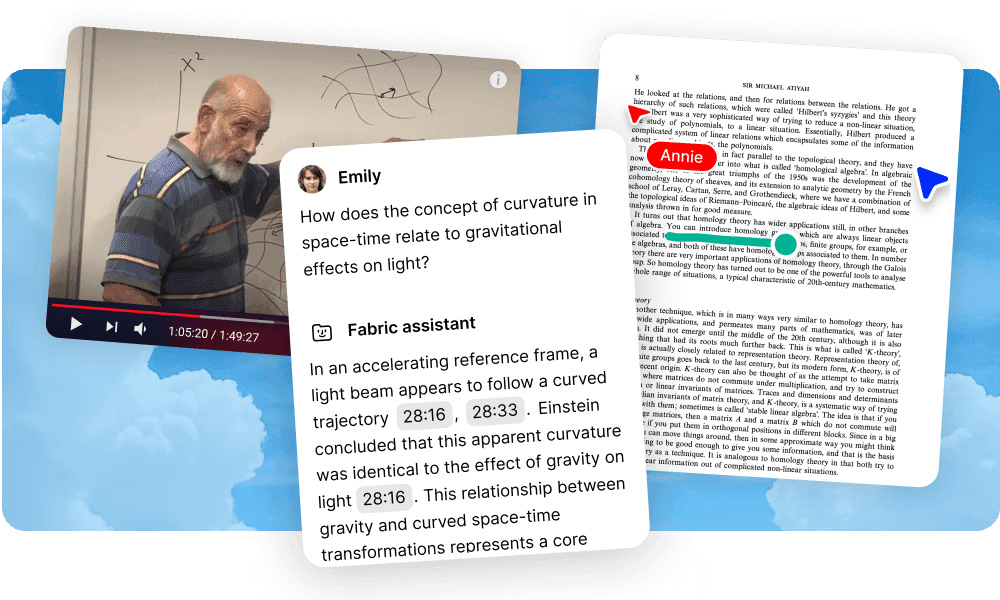
Fabric is an AI workspace where everything you save becomes part of a connected, searchable library. For students, think of it as a private tutor that knows every lecture you've attended, every PDF you've read, every article you've saved, and every note you've written.
What makes it different for students: The AI assistant works across your entire library. You can ask "what did Professor Kim say about synaptic pruning, and how does it relate to the chapter I read last week?" and get an answer that draws from both the lecture transcript and the PDF. That's not something any other tool on this list can do. Your lecture from week 1 connects to your readings from week 4 connects to your seminar notes from week 8. The AI sees across all of it.
Record lectures with bot-free transcription. Read the live transcript during the conversation. Pause and resume if the professor goes off-topic. Regenerate the AI summary if the first one misses what mattered. The original audio is always available.
Works on every device. Phone in the lecture hall, laptop in the library, tablet on the couch. Easiest interface of any tool on this list. No setup, no configuration, no learning curve. Save something and it's understood.
Where it sits: Fabric is the right choice if you want your entire academic life in one place, with AI that understands all of it. If you just need a transcript or flashcards for tomorrow's exam, the simpler tools below will do.
Otter.ai
Otter is the classic lecture transcription app. It shows a live transcript while the professor speaks, which is useful for following along and catching things you missed.
What it does for students: Live transcript during lectures. Keyword search across past transcripts. AI chat lets you ask questions about a specific lecture. Reasonable starting price on the annual plan.
Where it stops: Minute caps. The free plan gives you 300 minutes per month with a 30-minute cap per conversation, which means it cuts off mid-lecture. Pro gives 1,200 minutes (reduced from 6,000 without a price cut). File imports capped at 10/month. English, French, and Spanish only. Each transcript is its own island. There's no AI that understands your transcripts alongside your readings and PDFs. It's a recording tool, not a learning tool.
Best for: Students who want a live transcript during lectures and don't need the notes connected to anything else.
TurboLearn AI
TurboLearn converts lectures into study materials. Upload a recording or PDF and get flashcards, quizzes, and podcast-style audio summaries.
What it does for students: Flashcards with spaced repetition. Auto-generated quizzes. Podcast-format summaries you can listen to while walking. Progress tracking. Affordable pricing. Good for active recall and exam prep.
Where it stops: Each upload is processed independently. The lecture from week 3 has no connection to the lecture from week 7. There's no library that grows smarter over time. No file storage, no notes editor, no collaboration, no search across your collection. It's a study drill tool, not a knowledge base. Good for memorising facts. Less useful for understanding how ideas connect.
Best for: Exam prep. Upload the lecture, generate flashcards, drill until it sticks. Works well for introductory courses where recall matters more than synthesis.
Notion
Notion is the workspace many students use to organise their academic lives. Course pages, reading lists, assignment trackers, class notes. It's flexible and powerful.
What it does for students: Build anything. Course databases, reading logs, project boards, shared group workspaces. AI writing and Q&A on the Plus plan. Real-time collaboration for group projects. Templates get you started quickly.
Where it stops: Notion doesn't record lectures. You need a separate tool for that. The AI works on your Notion pages, not on PDFs, recordings, or files stored elsewhere. Connections between content only exist if you build and maintain them yourself. The system is as good as the time you invest in designing it. Many students spend more time organising their Notion than studying. And it requires the Plus plan ($10/month) for AI features.
Best for: Students who enjoy building systems and want a structured workspace for organising their academic life alongside separate recording and reading tools.
Notability
Notability is an iPad handwriting app with audio recording that syncs to your notes. Write a word while the professor speaks, and later you can tap that word to jump to that exact moment in the recording.
What it does for students: Handwriting with Apple Pencil on iPad. Audio synced to your handwritten notes. Tap-to-seek playback. PDF annotation for marking up textbooks and handouts. AI-generated flashcards and summaries on paid plans. Affordable pricing.
Where it stops: Apple devices only. No Android, no Windows. Handwriting search (OCR) works within notes but there's no semantic search across your library. No AI that understands your content as a whole. Each notebook is separate. Notes from one subject don't connect to notes from another by meaning. AI features are basic and require a paid subscription ($7.99-20/month). It's a capture tool for lectures, not a system for building understanding across your degree.
Best for: iPad students who prefer handwriting and want audio synced to their notes during lectures. The tap-to-seek feature is uniquely useful for reviewing what the professor said at a specific moment.
How to choose
If you want one tool for your whole degree and you want the AI to understand everything, lectures, readings, PDFs, notes, all connected: Fabric. It's the only tool here where your knowledge compounds over time without you building the system.
If you need a live transcript during lectures and that's the main thing: Otter. Be aware of the minute caps.
If you need flashcards for an exam next week: TurboLearn. Upload the lecture, drill the cards.
If you want to build your own academic workspace and you enjoy the process of organising: Notion. Budget time for the setup.
If you're on iPad with Apple Pencil and you want handwriting synced to audio: Notability. Nothing else does tap-to-seek as well.
If you're not sure: Start with Fabric's free tier. Save a few lectures and PDFs. Ask the AI a question that spans two of them. That's the moment you'll feel the difference between a transcript and understanding.
What most student tool roundups miss
Most "best note-taking app for students" articles compare transcription accuracy, pricing, and platform support. Those matter. But they miss the question that defines your academic experience: does the tool help you learn, or does it just help you record?
A transcript of a lecture is not understanding. Flashcards from a PDF are not insight. A Notion page you built and never revisited is not knowledge. The tools that matter are the ones that help you connect what you heard on Monday to what you read on Wednesday to what you discussed on Friday. That's how learning works. Not one lecture at a time.
Most tools on this list treat each lecture as an isolated event. Fabric treats your degree as a growing body of knowledge. That's the difference.
FAQs
Can Fabric record lectures?
Yes. Bot-free transcription with a live transcript you can read during the lecture. You can pause and resume. The audio file is kept. The AI summary can be regenerated. The transcript becomes part of your searchable, connected library.
Is Fabric free for students?
Fabric has a free tier with limited storage and AI.
Can I ask Fabric questions about my lectures and readings together?
Yes. The AI understands your entire library. You can ask a question that spans a lecture recording, a PDF textbook chapter, a saved article, and your own notes. It draws from all of them.
Which is cheapest?
Otter and TurboLearn have limited free plans. Notion's free plan is generous for note-taking but has no AI. Notability's free plan includes basic features. Fabric has a free tier. For paid plans, TurboLearn (~$6-9/month) and Notability ($20/year) are the most affordable. Otter Pro is $8.33/month annual. Notion Plus is $10/month. Compare what you get, not just what you pay.
Do I need an iPad for any of these?
Only Notability requires an iPad (or iPhone/Mac). All others work on web, and most have Android apps. Fabric works on every platform: web, iOS, Android, desktop, and Chrome extension.
Can I use multiple tools together?
Yes. Some students use Notability for handwritten lecture notes, then save them into Fabric where they're connected to PDFs and readings. Others use TurboLearn for exam drill alongside Fabric for long-term knowledge. Use what works for each part of your workflow.
Which is best for group projects?
Fabric and Notion both support real-time collaboration. Fabric adds annotations on any content type, threaded comments, and shared drives. Notion has shared databases and page co-editing. Otter, TurboLearn, and Notability are single-user tools.
When should I write my essay, where do I go?
Fabric has a full markdown editor alongside your research. For academic citation formatting (APA, MLA, Harvard), pair it with Jenni AI or a reference manager like Zotero. Notion also works for writing but doesn't have your lecture recordings or semantic search.
Compare similar apps and tools:
Evaluating other options? See more comparisons:



Explore more comparions:
Evaluating other options? See more comparisons: