Personal Weekly Review
A quiet hour to close the week, clear your mind, and feel ready for what's next.
About
What is the Personal Weekly Review template?
The Personal Weekly Review template is a quiet note for closing out your week, not your work week, your actual week. It helps you clear the small clutter that's been accumulating, reflect on what happened and how your energy was, and step into the next week feeling ready rather than frayed. You add it to your workspace once and duplicate it each week. It's less about productivity and more about not letting weeks blur into one another unnoticed.
Time passes faster when no week is distinct from the last. A short, regular look back, what happened, how it felt, where your energy went, is what turns a stream of indistinguishable weeks into a life you're actually paying attention to.
What's laid out for you
The review moves gently from clearing to reflecting to looking ahead:
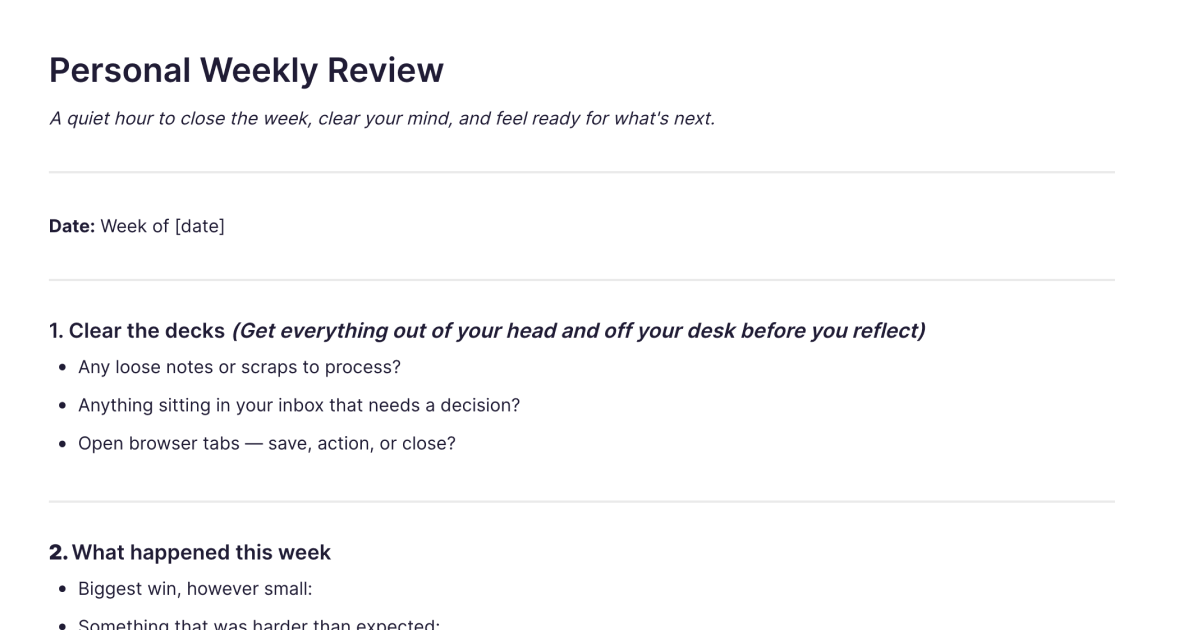
Clear the decks. Process the small stuff first, loose notes and scraps, anything in your inbox needing a decision, the browser tabs you've left open to deal with later. Clearing the clutter is what makes space to actually reflect.
What happened, and open loops. Your biggest win however small, something that was harder than expected, something you learned, and a moment worth remembering, plus whatever's unfinished or still nagging at you.
Your energy. A dedicated check the work review doesn't have: how was your energy this week? A sentence is enough. The point is simply to notice, week over week, what lifts you and what drains you.
How you spent your time. Where most of your energy actually went, and whether that's where you wanted it. The gap between the two, noticed honestly, is what changes the next week.
Next week, and the bigger picture. Three things that actually matter, anything to prepare or book in advance, one thing you want to do differently, and a brief glance at your longer-term goals, are you still heading in the direction you mean to?
How it works in Fabric
A weekly review rewards looking back, and that's where keeping it in Fabric matters. Your reviews are searchable by meaning, so you can trace how your energy has run over months, or find the week something first started nagging at you, by describing it. The moments worth remembering accumulate into a quiet record of the year, not a highlight reel, just what was actually there.
The AI assistant can read across your reviews and gently surface patterns you wouldn't catch one week at a time, when your energy tends to dip, what keeps ending up where your time goes, what you keep meaning to do differently. And because these reviews sit alongside your journal and reflections, the weekly look-back connects to the daily one rather than standing apart.
How to use it
Add it once. Install the template from the store and it's in your workspace.
Duplicate it each week. Make a copy at a quiet point in the week, the same time each week helps it hold.
Clear, then reflect. Process the loose ends first, then look back on the week and notice your energy without judging it.
Set what matters, gently. Choose three things that actually matter for next week and one thing to do differently, then glance at whether you're still heading where you mean to.
Related templates and guides
For closing out your professional week specifically, clearing the inbox, tracking projects, and planning work priorities, the Weekly Review (Work) template is the companion. The weekly review guide covers the practice in depth. And because this review is reflective rather than operational, it pairs naturally with the Daily Reflection and Daily Journal templates, the weekly look-back to their daily one.
Frequently asked questions
What is the Personal Weekly Review template?
It's a free Fabric note for reflecting on your week as a whole, with sections to clear small clutter, review what happened, notice your energy, see where your time went, and set what matters next week. You add it once and duplicate it each week.
How do I use it?
At a quiet point in the week, clear the loose ends, then reflect on what happened and how your energy was, and set three things that matter next week plus one thing to do differently. Each copy is a normal Fabric note, so it's searchable and builds a record over time.
Is it free?
Yes. The Personal Weekly Review template is free to add and use.
How is this different from the Weekly Review (Work) template?
This one is for your life: clearing personal clutter, noticing your energy, and reflecting on how the week actually felt. The Weekly Review (Work) template is for your job, clearing the inbox, tracking projects, and planning professional priorities. The structure is similar; the focus is different, and many people keep both.
Do I have to do it every week?
No. It's designed to be easy to keep up weekly, but there are no rules. The benefit comes from doing it regularly enough that weeks stay distinct, not from perfect consistency.
Why is there a section just for energy?
Because how your energy runs is one of the most useful things to track over time and one of the easiest to ignore in the moment. Noticing it each week, even in a sentence, reveals patterns, what lifts you and what drains you, that a single week can't show.
Can the AI show me patterns over time?
Yes. The AI assistant can read across your reviews and surface patterns in your energy, your time, and what you keep meaning to change.
Can I keep it private?
Yes. Your reviews are encrypted and visible only to you. Nothing is shared unless you choose to share it.
Can I use it on my phone?
Yes. With the mobile app you can do your weekly review wherever you are, and it syncs across your devices.
Where can I learn the weekly review habit?
The weekly review guide covers what a weekly review is for and how to make it a habit that lasts.
What is Fabric?
Fabric is an AI workspace for your projects, ideas, and files.
Save anything – PDFs, images, links, notes, voice memos, videos – and search across all of it by meaning, not just keywords. Think visually on an infinite canvas, connect your tools like Gmail, Google Drive, Notion, and Figma, and work alongside a personal AI assistant that knows your work, remembers your context, and gets smarter the more you use it.
Available on web, iOS, Android, and desktop.
