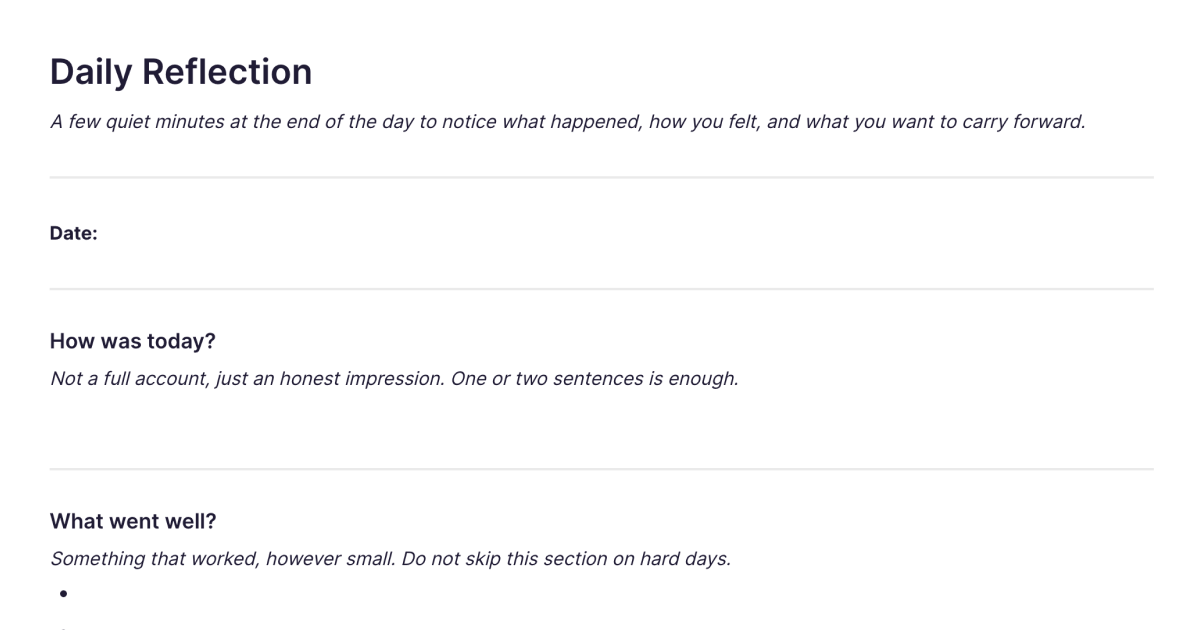
Daily Reflection
A few quiet minutes at the end of the day to notice what happened, how you felt, and what you want to carry forward.
About
What is the Daily Reflection template?
The Daily Reflection template is a short, guided note for closing out your day. It gives you three small prompts, what happened, how you felt, and what you want to carry forward, each laid out as its own section, so reflecting takes a few quiet minutes rather than a blank page and an open-ended ask. You add it to your workspace once and duplicate it each evening. The structure is the point: a small, finishable ritual you can actually keep up, not another thing to feel behind on.
What's inside
Three prompts, already laid out as sections you fill in:
What happened. A quick account of the day, the things worth noting, not a full record. Enough to anchor the rest.
How you felt. A moment to name the day's mood and energy, which is the part most of us skip and the part that, over time, tells you the most.
What to carry forward. One or two things to take into tomorrow, a lesson, an intention, something unfinished, so the day closes with a sense of direction rather than just stopping.
You work down the three in a couple of minutes and you're done. There's no expectation to write at length, and nothing left hanging.
Why a short daily ritual works
The value of reflection isn't in any single evening; it's in the streak. A practice you can finish in a few minutes is one you'll still be doing in a month, where an open-ended journal can quietly turn into something you avoid. The three prompts give just enough structure to make starting easy and finishing certain.
Keeping it in Fabric is what makes the streak pay off. Each evening's note is searchable by meaning, so you can look back and find the day you felt a particular way, or the intention you set a fortnight ago, by describing it rather than scrolling. Over weeks, the AI assistant can read across your reflections and surface what you wouldn't notice one evening at a time: how your mood tracks across a month, what keeps showing up in "carry forward," when your better days tend to cluster. And on a tired evening you can record a voice note instead of typing; Fabric transcribes it so it's as searchable as the rest.
Your reflections are private, encrypted and visible only to you, which is what lets the "how you felt" prompt be honest.
How to use it
Add it once. Install the template from the store and it's in your workspace.
Duplicate it each evening. Make a copy at the end of the day and fill in the three prompts.
Keep it short. A line or two per prompt is plenty. The aim is to finish, not to produce.
Look back when it helps. Use search to revisit a particular day, or ask the assistant to summarise the week's reflections when you want the longer view.
Daily Reflection and the wider practice
This template is the brief, guided end of a spectrum. If you'd rather an open page with no prompts and no fixed length, the Daily Journal template gives you exactly that, the same daily habit without the structure. For the bigger picture of keeping reflections searchable across formats and reflecting over months and years, see journaling and reflection. And for a structured look back over a longer horizon, the weekly review guide and the Personal Weekly Review template are the natural counterpart to a daily check-in.
Frequently asked questions
What is the Daily Reflection template?
It's a free Fabric note with three guided prompts, what happened, how you felt, and what to carry forward, laid out as sections for a short end-of-day reflection. You add it once and duplicate it each evening.
How do I use it?
Duplicate the template at the end of the day and fill in the three prompts, a line or two each is enough. Every copy is a normal Fabric note, so it's searchable and can hold text, voice, and images.
Is it free?
Yes. The Daily Reflection template is free to add and use.
How is this different from the Daily Journal template?
The Daily Reflection template is short and guided: three set prompts you can finish in a few minutes. The Daily Journal template is open: a blank daily page with no prompts and no rules. Reflection suits an evening ritual you want to keep brief and consistent; the journal suits writing freely at whatever length the day calls for. Some people use both.
Do I have to do it every day?
No. It's designed to be easy to keep up daily, but there are no rules. Reflect on the evenings you want to, and skip the ones you don't.
Can I do it as a voice note instead of typing?
Yes. Record a voice note and Fabric transcribes it, so it's searchable alongside your written reflections. Useful when you're too tired to type.
Can I look back over my past reflections?
Yes. Each reflection is searchable by meaning, so you can find a particular day by describing it, and ask the AI assistant to summarise a week or surface patterns across many evenings.
Can the AI show me patterns in how I've felt?
Yes. Over time the AI assistant can read across your reflections and surface things like how your mood and energy shift across a month, or what recurs in what you choose to carry forward.
Is my reflection private?
Yes. Your reflections are encrypted and visible only to you. Nothing is shared unless you choose to share it.
Can I use it on my phone?
Yes. With the mobile app you can reflect from anywhere at the end of the day, by typing or recording a voice note, and it syncs across your devices.
What is Fabric?
Fabric is an AI workspace for your projects, ideas, and files.
Save anything – PDFs, images, links, notes, voice memos, videos – and search across all of it by meaning, not just keywords. Think visually on an infinite canvas, connect your tools like Gmail, Google Drive, Notion, and Figma, and work alongside a personal AI assistant that knows your work, remembers your context, and gets smarter the more you use it.
Available on web, iOS, Android, and desktop.
