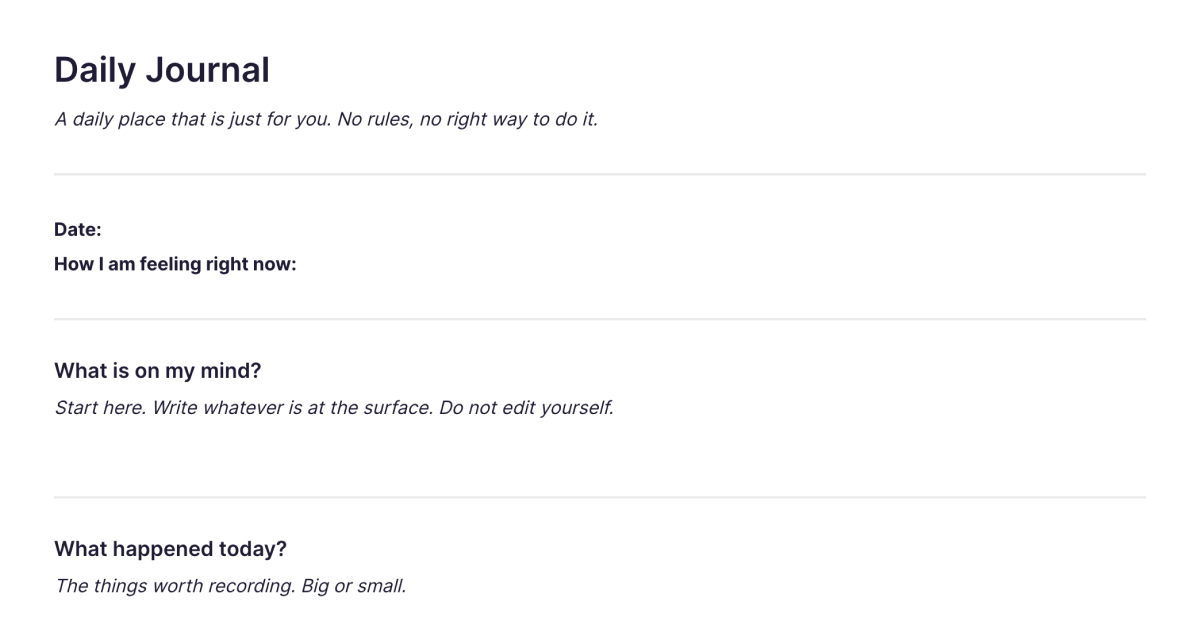
Daily Journal
A daily place that is just for you. No rules, no right way to do it.
About
What is the Daily Journal template?
The Daily Journal template is a ready-made note for keeping a daily journal in Fabric. You add it to your workspace once, then duplicate it whenever you want to write an entry, so starting a new day's journaling takes no setup and no thinking about format. It's a daily place that's just for you: no rules, no prompts you have to answer, no right way to do it. Some days you'll write a paragraph, some days a line, some days nothing at all, and the template doesn't mind either way.
What you get
A clean daily entry, ready to write in. Each time you duplicate the template you get a fresh note to fill however the day calls for, a few sentences about what happened, a thought you want to hold onto, a decision you're turning over. There's nothing to configure and nothing to delete first. The entry just needs to exist.
Because it's a Fabric note, an entry isn't only a place to write. You can drop in a voice note on days when talking is easier than typing, add a photo or screenshot that captures the moment better than words, and it all lives in the same entry. The template gives you the daily habit; Fabric makes the habit worth keeping.
What happens to your entries over time
A journal is only as useful as your ability to look back through it, and this is where keeping it in Fabric changes things. Every entry you write is searchable by meaning, so months later you can find a thought by describing it, "the day I decided to change the plan," rather than scrolling back through a calendar trying to remember when it was. Typed entries, transcribed voice notes, and the text in a photo are all findable the same way.
Over a longer stretch, the AI assistant can read across your entries and surface what you'd never spot by re-reading: recurring themes, how your thinking on something has shifted, the conditions around your better and worse weeks. The journal stops being a pile of past entries and becomes something you can actually ask questions of.
Your journal is private. Entries are encrypted and visible only to you, and nothing is shared unless you choose to share it.
How to use it
Add it once. Install the template from the store and it's in your workspace, ready to go.
Duplicate it each day. When you want to journal, make a copy and write. Don't worry about titles, formatting, or doing it "properly", the point is to capture the day, in whatever form it takes.
Write, speak, or snap. Type an entry, record a voice note on the walk home, or add a photo. They all belong in the same journal.
Look back by searching, not scrolling. When you want to revisit something, search for it in plain language and let Fabric find the entry.
If you want the fuller picture of how daily notes, voice memos, and photos build into a journal you can search and reflect on over years, see journaling and reflection. For a weekly counterpart to daily writing, the Personal Weekly Review template is a natural pairing.
Frequently asked questions
What is the Daily Journal template?
It's a free, reusable note for journaling in Fabric. You add it to your workspace once and duplicate it for each day's entry, so there's no setup every time you want to write.
How do I use it?
Add the template, then duplicate it whenever you want to journal and write in the copy. Each entry is a normal Fabric note, so it's searchable and can hold text, voice, and images.
Is it free?
Yes. The Daily Journal template is free to add and use.
Do I have to journal every day?
No. There are no rules. Some people write daily, some sporadically. Duplicate the template whenever you feel like writing, and skip the days you don't.
Can I add voice notes or photos to an entry?
Yes. An entry can hold a typed note, a voice note that Fabric transcribes, photos, and screenshots, all in the same place and all searchable.
Can I find an old entry by what I wrote about?
Yes. Fabric's search reads inside your entries and works by meaning, so you can find a past entry by describing it rather than remembering the date.
Can the AI help me reflect on my journal?
Yes. The AI assistant can read across your entries to summarise a period, surface recurring themes, or show how your thinking on something has changed over time.
Is my journal private?
Yes. Your entries are encrypted and visible only to you. Nothing is shared unless you choose to share it.
Can I journal on my phone?
Yes. With the mobile app you can write, record a voice note, or add a photo on the go, and your entries sync across your devices.
Can I change the template to suit me?
Yes. It's your note to make your own. Use it as it comes, or adjust how you write in it, there's no fixed structure you have to keep.
Where can I learn more about journaling in Fabric?
The journaling and reflection page goes deeper on keeping a searchable journal across formats and reflecting on it over time.
What is Fabric?
Fabric is an AI workspace for your projects, ideas, and files.
Save anything – PDFs, images, links, notes, voice memos, videos – and search across all of it by meaning, not just keywords. Think visually on an infinite canvas, connect your tools like Gmail, Google Drive, Notion, and Figma, and work alongside a personal AI assistant that knows your work, remembers your context, and gets smarter the more you use it.
Available on web, iOS, Android, and desktop.
