Evergreen Note
A single, developed idea written in your own words. Not a summary of a source. Not a fleeting thought. A note built to last and connect.
About
What is the Evergreen Note template?
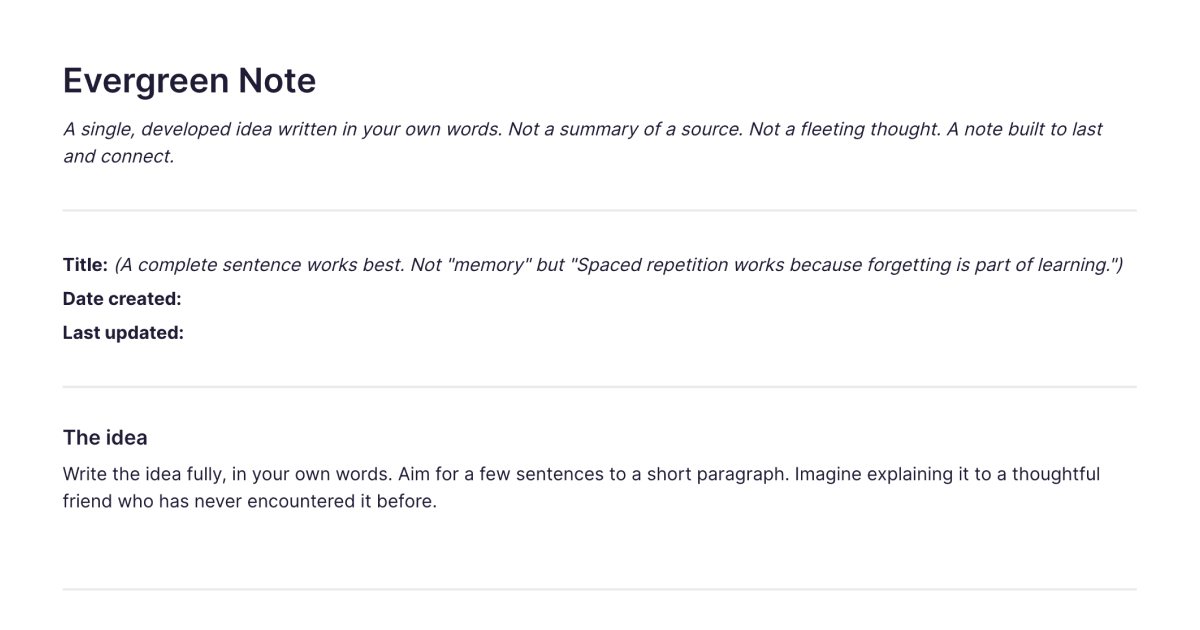
The Evergreen Note template is a ready-made shape for writing an evergreen note: a single, developed idea written in your own words, meant to be refined and linked to over time rather than used once and forgotten. It's not a summary of a source and not a fleeting thought. The template gives you the structure a good evergreen note wants, a claim-style title, room to express the idea clearly, and a place for links to related notes, so you start from the right shape instead of a blank page. You add it to your workspace once and duplicate it each time you want to capture a new idea.
What's laid out for you
A title that's a claim. Evergreen notes are titled as a statement, "spaced repetition aids long-term recall," not a topic, "memory." The template prompts for a title that says what the note actually asserts, which is what makes it precise and easy to link to later.
The idea, in your own words. Space to develop one concept clearly, written so it stands on its own and makes sense to you in two years without re-reading a source. Putting it in your own words is what turns someone else's point into your understanding.
Links to related notes. A place to connect this note to others, with a line on how they relate. This is the part that compounds: as your notes link to each other, clusters form around the ideas you think about most, and connections you didn't plan start to appear.
The shape keeps each note to one idea, in your voice, connected to the rest, which is most of what makes a note evergreen.
How Fabric helps it compound
Evergreen notes get their value from being linked, and Fabric makes the linking far easier than paper or a plain notes app. When you write or update a note, semantic search finds related notes by meaning, so you can connect to something you wrote months ago even if you framed it in different words at the time. The hardest part of the practice, finding the connection, is the part Fabric most directly helps with.
The AI assistant can surface related notes as you write, suggest where a new idea connects, and draw on the body of notes you've built. You can annotate a source PDF and tie it to the evergreen note the idea fed into, keeping the thinking and its origin connected. And because everything lives in one searchable library, a note doesn't sit in isolation, it's part of a growing network of your own thinking.
A note or two behaves like any note. A few hundred, linked, start to behave like a second mind: the longer you keep it up, the more it gives back.
How to use it
Add it once. Install the template from the store and it's in your workspace.
Duplicate it for each new idea. Start a new note whenever you have a distinct concept worth developing, one idea per note.
Title it as a claim, write it in your own words. Say what the note asserts, and express the idea so it stands alone.
Link it, and update it over time. Connect it to related notes as you write, and when you meet the same idea again, return to the note and develop it rather than starting another. That returning is where the practice pays off.
Learn the method
This template gives you the shape; for the full method, what makes a note atomic, why concept-orientation matters, how dense linking turns notes into insight, the evergreen notes guide is the complete walkthrough. Evergreen notes draw heavily on the Zettelkasten tradition, and if you want to publish and grow your notes in the open, the digital garden guide covers that. Many evergreen notes start life in your reading: the Book Notes template is a good source of ideas to distil into concept-level notes.
Frequently asked questions
What is an evergreen note?
An evergreen note is a note about a single idea, written in your own words and meant to be refined and linked to over time, rather than a summary of a source or a passing thought. The term comes from Andy Matuschak. The evergreen notes guide explains the full concept.
What is the Evergreen Note template?
It's a free Fabric note laid out for writing one evergreen note: a claim-style title, space for the idea in your own words, and a place for links to related notes. You add it once and duplicate it for each new idea.
How do I use it?
Duplicate the template for each distinct idea, title it as a claim, write the idea in your own words, and link it to related notes. When you encounter the idea again later, update the existing note rather than making a new one.
Is it free?
Yes. The Evergreen Note template is free to add and use.
Should I make a new note or update an existing one?
Make a new one for a genuinely distinct idea; update the existing one when you've met the same concept again and have something to add. Updating in place rather than starting fresh is what lets your thinking on an idea accumulate.
How is this different from a book summary or reading notes?
A summary captures what a source says; an evergreen note captures your own developed idea, in your words, often drawing on several sources over time. For notes tied to a specific book, the book notes guide is a better fit; evergreen notes are where the ideas from your reading get distilled and connected.
How does Fabric help me link my notes?
Fabric's semantic search finds related notes by meaning, so you can connect a new note to earlier ones even when the wording differs, and the AI assistant can surface relevant notes as you write.
Is this the same as Zettelkasten?
They're closely related and largely compatible. Evergreen notes are a less prescribed set of principles; Zettelkasten is a more structured system. The evergreen notes guide covers how they compare.
Can I use it on my phone?
Yes. With the mobile app you can write and link notes wherever you are, and they sync across your devices.
What is Fabric?
Fabric is an AI workspace for your projects, ideas, and files.
Save anything – PDFs, images, links, notes, voice memos, videos – and search across all of it by meaning, not just keywords. Think visually on an infinite canvas, connect your tools like Gmail, Google Drive, Notion, and Figma, and work alongside a personal AI assistant that knows your work, remembers your context, and gets smarter the more you use it.
Available on web, iOS, Android, and desktop.
