Book Notes
A place to capture what a book gave you, in a form you will actually come back to.
About
What is the Book Notes template?
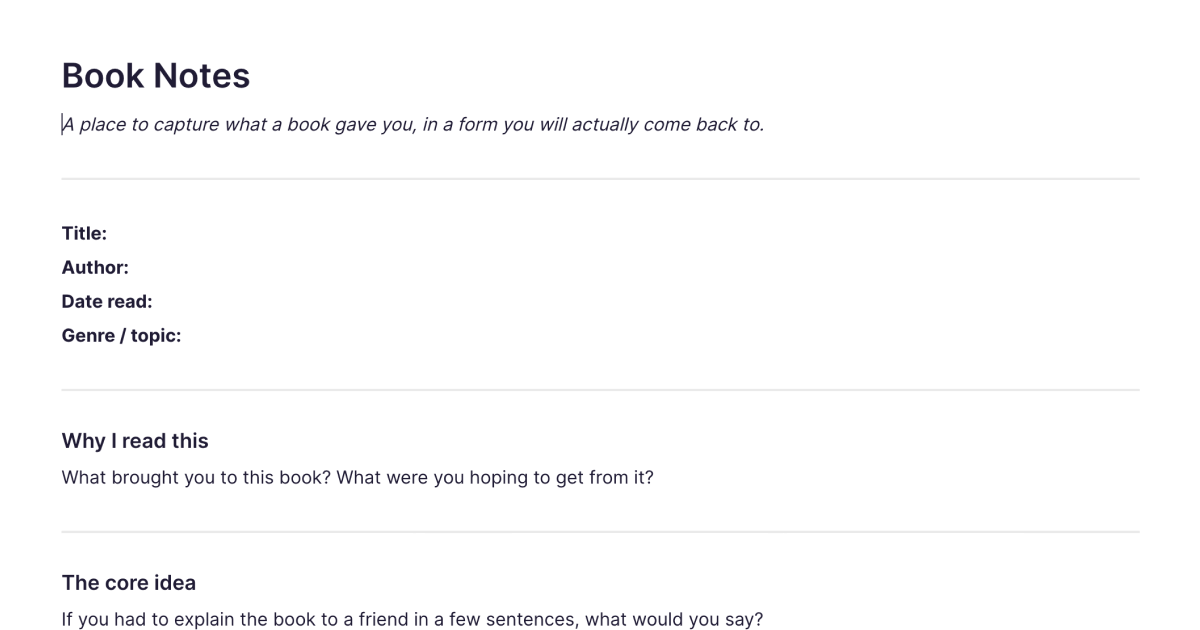
The Book Notes template is a place to capture what a book gave you, in a form you'll actually return to rather than a highlight dump you never reopen. It moves from why you read the book and its core idea, through the ideas that stuck and the passages worth keeping, to the part that matters most: what you'll do differently because of it. You add it to your workspace once and duplicate it for each book you finish.
Most reading evaporates. You finish a book, feel changed by it, and a month later can barely recall its argument. The difference between a book that shaped you and one you merely read is whether you did anything with it. These notes are built to make that more likely.
What's laid out for you
The template captures a book the way you'd actually want to remember it:
Why you read it, and the core idea. What brought you to the book and what you hoped for, and then the book in a few sentences, the version you'd give a friend. If you can't say the core idea simply, you haven't quite got it yet.
Key ideas and passages worth keeping. The ideas that stuck, in your own words rather than the author's, and just one or two lines or passages worth remembering. The point is selection, not an exhaustive transcript.
Pushback. What you disagreed with or found unconvincing. Reading critically, not just receptively, is what turns a book into your own thinking rather than someone else's.
How you'll use it. The most important section: what you'll actually do differently because of this book. This is what separates notes you return to from notes you abandon.
Related books, and a rating. What this connects to or builds on, and a score out of five with a sentence on why.
How it works in Fabric
Book notes are most valuable years later, when a book you read once becomes relevant again, and that's exactly when most notes are unfindable. In Fabric, every set of book notes is searchable by meaning, so you can find the book that made a particular argument by describing the idea, not by remembering the title. The "related books and ideas" you note connect to the rest of your library, so a book sits near the others on the same theme and the notes you've made elsewhere.
The AI assistant can draw across your reading, telling you what you've read on a topic, comparing how two books treat an idea, or resurfacing a book whose argument bears on something you're working on now. You can capture a thought as a voice note while reading, and turn "how I'll use this" into a task or reminder so the intention doesn't evaporate with the rest.
How to use it
Add it once. Install the template from the store and it's in your workspace.
Duplicate it per book. Make a copy for each book you finish, with its title, author, and the date you read it.
Capture the core idea and what stuck. Say what the book is about in a few sentences, note the ideas that landed in your own words, and keep a passage or two, no need to be exhaustive.
Decide how you'll use it. Write what you'll actually do differently, and turn that into action so the book changes something rather than just being logged.
Related templates and guides
For the full approach to reading and retaining books, the book notes guide is the complete walkthrough. When an idea from a book is worth developing beyond the book itself, the Evergreen Note template is where you distil it into a concept-level note that connects across everything you read. For academic papers rather than books, the Research Paper Summary template is the equivalent, and the commonplace book guide covers keeping passages and quotations worth returning to.
Frequently asked questions
What is the Book Notes template?
It's a free Fabric note for capturing a book: why you read it, its core idea, the key ideas in your own words, passages worth keeping, your pushback, how you'll use it, related books, and a rating. You add it once and duplicate it for each book.
How do I use it?
After finishing a book, write its core idea in a few sentences, note the ideas that stuck and a passage or two, add what you disagreed with, and, most importantly, what you'll do differently because of it. Each copy is a normal Fabric note, so it's searchable and connects to your other reading.
Is it free?
Yes. The Book Notes template is free to add and use.
How is this different from the Research Paper Summary template?
This is for books read for understanding or interest, with room for why you read it, your pushback, how you'll use it, and a rating. The Research Paper Summary template is for academic papers, focused on method, findings, and limitations. Use this for books; use that for papers.
How is this different from an evergreen note?
Book notes capture one book. An evergreen note captures a single idea in your own words, developed across everything you read, including from your book notes. They work together: a book note is where you record what a book gave you; an evergreen note is where a worthwhile idea from it grows beyond the book.
Do I need to capture everything in the book?
No, the opposite. The template steers you toward selection: the core idea, a few ideas that stuck, one or two passages. Notes you'll actually return to are short and chosen, not exhaustive.
Can the AI help me across my book notes?
Yes. The AI assistant can draw across your reading, telling you what you've read on a topic, comparing how books treat an idea, or resurfacing one relevant to what you're working on.
Can I find a book by what it was about?
Yes. Every set of notes is searchable by meaning, so you can find a book by describing its argument or an idea from it, even years later.
Can I use it on my phone?
Yes. With the mobile app you can capture notes or a passage as you read, by typing or voice, and they sync across your devices.
Where can I learn the full approach?
The book notes guide is a complete walkthrough of reading actively and keeping notes you'll come back to.
What is Fabric?
Fabric is an AI workspace for your projects, ideas, and files.
Save anything – PDFs, images, links, notes, voice memos, videos – and search across all of it by meaning, not just keywords. Think visually on an infinite canvas, connect your tools like Gmail, Google Drive, Notion, and Figma, and work alongside a personal AI assistant that knows your work, remembers your context, and gets smarter the more you use it.
Available on web, iOS, Android, and desktop.
