Essay Outline
A place to think before you write. The clearer the outline, the easier the draft.
About
What is the Essay Outline template?
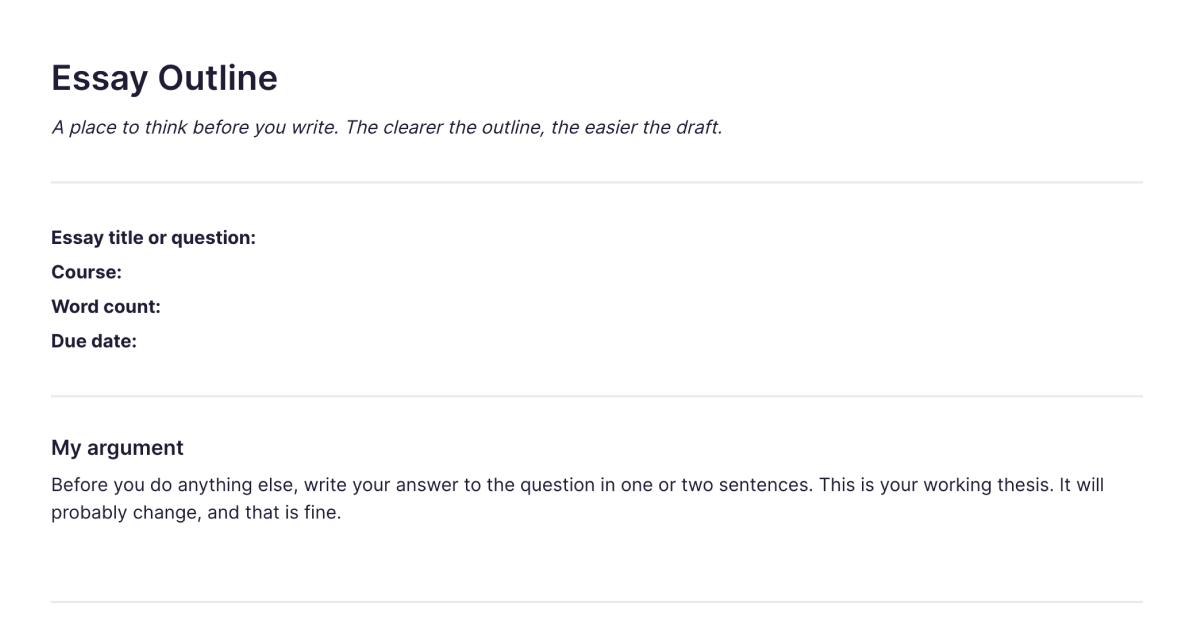
The Essay Outline template is a place to think through an essay before you write it. It starts with your working thesis, then helps you build the argument section by section, plan the introduction and conclusion, anticipate the counterargument, and line up the sources you'll use. You add it to your workspace once and duplicate it for each essay. The clearer the outline, the easier the draft: most of the difficulty in writing an essay is working out what you actually want to argue, and this is where you do that, before the blank page.
What's laid out for you
The template follows the shape of a well-structured essay:
Your argument first. Before anything else, write your answer to the question in a sentence or two. This is your working thesis. It will probably change, and that's fine, having it written gives everything else something to point at.
Key terms. Any terms in the question that need defining or unpacking before you begin, the step that stops an essay drifting off the actual question.
Introduction, body, and conclusion. Prompts for the context and structure your intro needs, then a section-by-section build where each section states one main point, its evidence, and, crucially, how it supports the thesis. The conclusion restates the thesis in light of the argument, draws out implications, and names what the essay leaves open.
The counterargument. The strongest objection to your argument and how you'll address it, engaging with it is what separates a strong essay from a one-sided one.
Sources to use and to find. What you already have, and the gaps you still need to fill, plus a notes-to-self space for threads to pull on as you write.
The repeated "how this supports the thesis" prompt is the heart of it: it keeps every section earning its place rather than wandering.
How it works in Fabric
An outline is most useful when it's connected to the material you're writing from. In Fabric, your outline sits in the same library as your sources and reading notes, all searchable by meaning, so as you plan a section you can find the source or note that belongs in it by describing it. If you've captured papers with the Research Paper Summary or Literature Review templates, the evidence for your argument is already in your library and ready to pull into the outline.
The AI assistant can work from your collected material, helping you find what you've read that bears on a section, or what you have that might support or challenge your thesis. And because the outline, your sources, and eventually your draft all live together, the planning connects directly to the writing rather than sitting in a separate document.
How to use it
Add it once. Install the template from the store and it's in your workspace.
Duplicate it per essay. Make a copy for each essay, with its title or question, word count, and due date.
Write the thesis first. Get your working answer down before anything else, then build the argument around it.
Plan each section to support the thesis. For every section, set the point, the evidence, and how it advances the argument, then note which sources you have and which you still need.
Related templates and guides
The outline is where reading turns into argument, so it pairs with the templates you read with: the Research Paper Summary for processing individual papers, and the Literature Review template when you're building an argument across many sources. For the surrounding skills, see note-taking basics, the research workflow guide, and building a student study system.
Frequently asked questions
What is the Essay Outline template?
It's a free Fabric note for planning an essay before you write: a working thesis, key terms, a section-by-section argument with evidence, the counterargument, the conclusion, and the sources you'll use. You add it once and duplicate it for each essay.
How do I use it?
Start by writing your thesis in a sentence or two, then build the argument section by section, with each section's point, evidence, and link to the thesis. Add the counterargument and conclusion, and list the sources you have and need. Each copy is a normal Fabric note, so it's searchable and sits with your sources.
Is it free?
Yes. The Essay Outline template is free to add and use.
Why start with the thesis before researching more?
Because a working thesis, even a rough one, gives your reading and structure something to point at. You can refine or change it as you go, but writing an essay without a sense of what you're arguing tends to produce a description rather than an argument. The thesis is a starting position, not a final commitment.
Can I pull my sources into the outline?
Yes. If you've captured sources with the Research Paper Summary or Literature Review templates, they're in your library and searchable by meaning, so you can find the right evidence for a section as you plan it.
Can the AI assistant help me plan the essay?
Yes. The AI assistant can draw on your collected sources and notes to help you find what bears on a section or what might support or challenge your thesis.
Does it work for any kind of essay?
It's built around argumentative and academic essays, the thesis-and-evidence structure, but the plan-before-you-write approach helps with most structured writing. Adapt the sections to fit shorter or differently shaped pieces.
Can I use it on my phone?
Yes. With the mobile app you can outline an essay or jot a thought for one wherever you are, and it syncs across your devices.
Where can I learn the surrounding skills?
The research workflow guide and note-taking basics cover the reading and note-taking that feed a good essay outline.
What is Fabric?
Fabric is an AI workspace for your projects, ideas, and files.
Save anything – PDFs, images, links, notes, voice memos, videos – and search across all of it by meaning, not just keywords. Think visually on an infinite canvas, connect your tools like Gmail, Google Drive, Notion, and Figma, and work alongside a personal AI assistant that knows your work, remembers your context, and gets smarter the more you use it.
Available on web, iOS, Android, and desktop.
