Brain Dump
Everything out of your head and onto the page. No filter, no structure, no judgment.
About
What is the Brain Dump template?
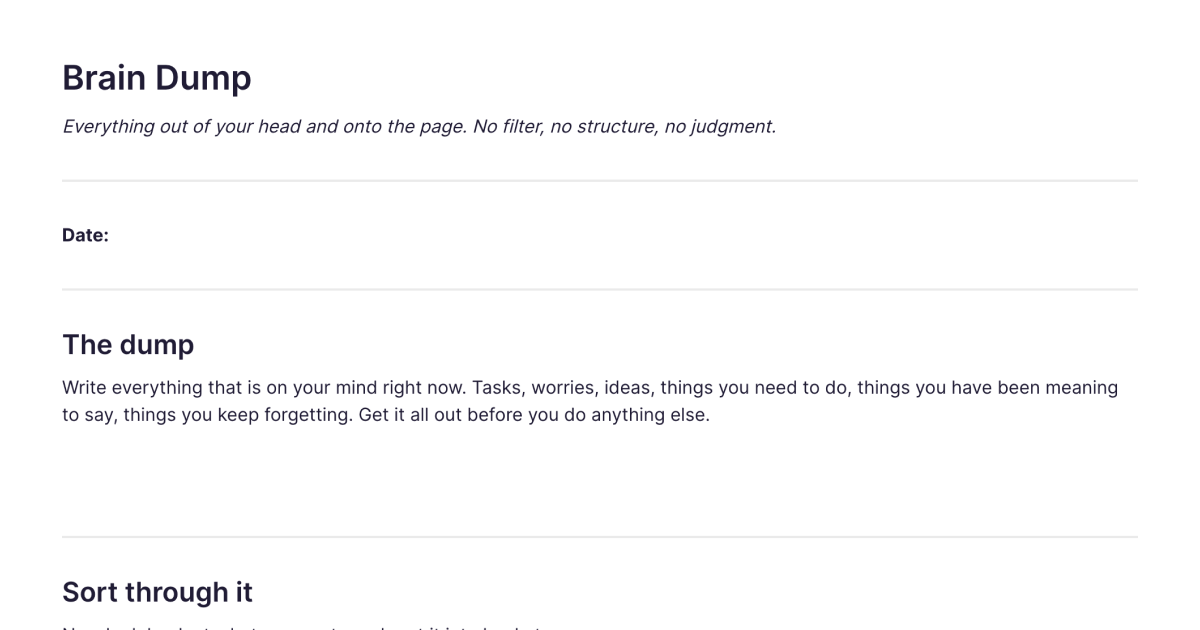
The Brain Dump template is a place to get everything that's swirling in your head out onto the page, and then make sense of it. It starts with a single open space where you write with no filter, no structure, and no judgment, every task, worry, idea, and half-remembered thing you've been carrying. Then it helps you sort what came out into clear buckets, so the relief of emptying your head turns into a short list of what actually matters. You add it to your workspace once and duplicate it whenever your head feels too full.
It's not a daily habit you have to keep up. It's something you reach for when the mental clutter has built up and you need to clear it, before a busy week, when you can't focus, when you can't sleep for the loop of unfinished things.
How it works, in two phases
First, the dump. One open space, and the only instruction is to get everything out before you do anything else. Tasks, worries, ideas, things you've been meaning to say, things you keep forgetting. No order, no editing, no deciding whether something belongs. The point of this phase is relief: your head holds far less once the loop is on the page instead.
Then, the sort. Once it's all out, the template walks you through sorting it into buckets, things to do, things to decide, things to let go of, ideas worth keeping, and things you're waiting on someone else for. A "what needs attention first" step pulls out the few things that actually matter this week, and a leftovers section catches anything that doesn't fit but you don't want to lose. This is where a pile of anxious noise becomes a short, honest list you can act on.
The "let go of" bucket does quiet work. Naming the things that have been nagging at you but don't actually deserve your time is often the most relieving part of the whole exercise.
How it works in Fabric
A brain dump on paper does the clearing, but the page gets thrown away and the few things that mattered go with it. Doing it in Fabric keeps the value.
Each dump is a Fabric note, searchable by meaning alongside everything else you've saved, so the idea you offloaded last month is findable when it becomes relevant, you don't lose it just because you cleared it. The things you sorted into "to do" can become tasks and reminders so they actually get picked up. And when your head's too full to type, you can dump out loud as a voice note and let Fabric transcribe it, sometimes talking is the faster way to empty it. The AI assistant can even help you sort a long dump, grouping what you wrote so the pile feels less overwhelming.
How to use it
Add it once. Install the template from the store and it's in your workspace.
Duplicate it whenever you need to clear your head. There's no schedule, reach for it when the clutter builds up.
Dump first, sort second. Get everything out in the open space before you judge or organise any of it. Only once it's all down do you sort it into the buckets.
Pull out what matters this week, and act on it. Turn the "to do" items into tasks, and let search keep the rest for whenever you need it.
Where it fits
A brain dump is the capture-everything step that sits underneath most productivity systems. If you want a method for turning what you dumped into reliable next actions, Getting Things Done is built around exactly this "mind sweep" move. If you keep a bullet journal, a dump is a good way to feed its daily log. And because it externalises a racing mind, it's a particularly useful tool for ADHD, where getting the loop out of your head is often the only way to think clearly.
Frequently asked questions
What is a brain dump?
A brain dump is the practice of writing down everything on your mind, with no filter or order, to clear the mental clutter. Getting it all out of your head and onto the page frees up attention and makes it easier to see what actually needs doing.
What is the Brain Dump template?
It's a free Fabric note with two phases: an open space to dump everything out, then a set of buckets, to do, decide, let go of, keep, waiting on, plus a "what matters this week" step, to sort what came out. You add it once and duplicate it whenever you need to clear your head.
How do I use it?
Write everything on your mind in the open space first, without judging or organising it. Then sort the pile into the buckets, pull out the few things that matter this week, and turn those into actions. Each copy is a normal Fabric note, so it stays searchable.
Is it free?
Yes. The Brain Dump template is free to add and use.
How is this different from the Daily Journal template?
A brain dump is something you reach for when your head is too full, an episodic clear-out that ends in a sorted, actionable list. The Daily Journal template is an open, ongoing daily writing habit for reflection, with no sorting step. One clears and triages; the other reflects over time.
When should I do a brain dump?
Whenever the mental clutter has built up: before a busy week, when you can't focus, when you're lying awake running through unfinished things. There's no schedule, it's a tool for when you need it.
Can I turn what I dump into tasks?
Yes. Items you sort into "things to do" can become tasks and reminders in Fabric, so the things that matter actually get followed up rather than sinking back into the pile.
Can I do it as a voice note?
Yes. When typing is too slow for a racing mind, record a voice note and Fabric transcribes it, so you can dump out loud and sort it afterwards.
Is a brain dump good for ADHD?
Many people with ADHD find it helps to externalise a busy mind onto the page, where it's easier to see and sort than when it's looping in your head. See more on ADHD-friendly approaches.
Can I use it on my phone?
Yes. With the mobile app you can dump and sort wherever you are, by typing or voice, and it syncs across your devices.
What is Fabric?
Fabric is an AI workspace for your projects, ideas, and files.
Save anything – PDFs, images, links, notes, voice memos, videos – and search across all of it by meaning, not just keywords. Think visually on an infinite canvas, connect your tools like Gmail, Google Drive, Notion, and Figma, and work alongside a personal AI assistant that knows your work, remembers your context, and gets smarter the more you use it.
Available on web, iOS, Android, and desktop.
