1:1 Meeting Notes
A running space to prepare, listen, and follow through on your most important working relationships.
About
What is the 1:1 Meeting Notes template?
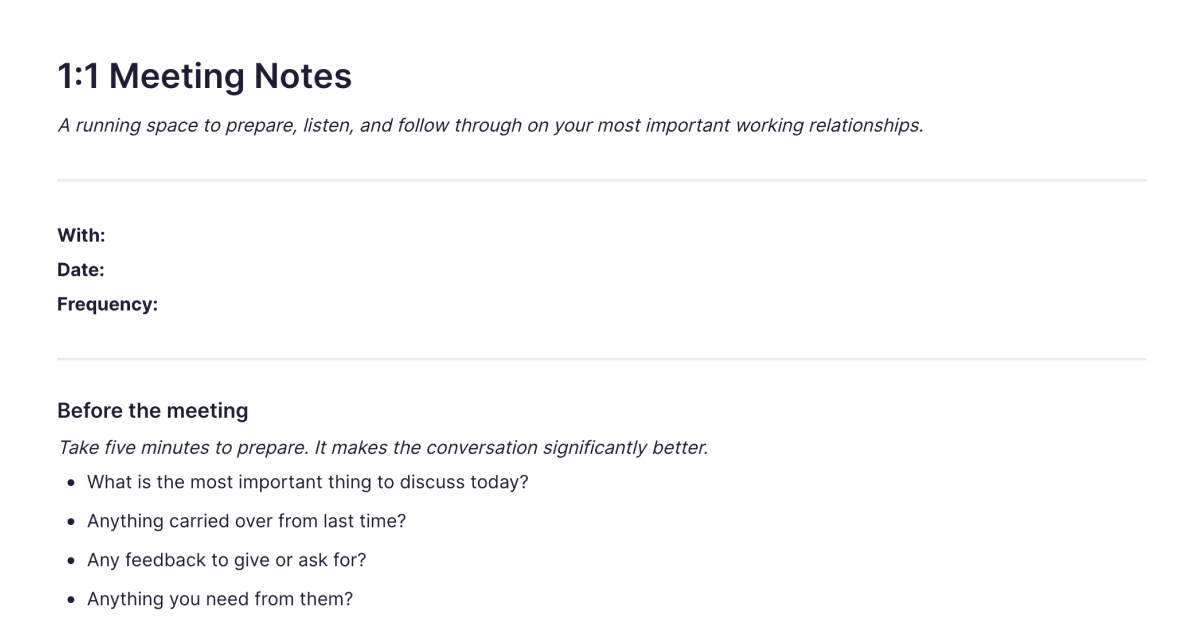
The 1:1 Meeting Notes template is a running space for your one-on-ones with one person, a manager, a report, a key collaborator, kept in a single note you return to each time you meet. Rather than a fresh page per meeting, it's a continuous record of the relationship: what you prepared, what each of you raised, what you agreed, and what carries into next time. You add it to your workspace once and keep one running note per person you have regular 1:1s with.
The value of a 1:1 isn't in any single meeting; it's in the continuity. Keeping prep, follow-through, and the threads between sessions in one place is what turns a series of separate conversations into a working relationship that actually develops.
What's laid out for you
The template is organised around the three things a good 1:1 needs, before, during, and after:
Before the meeting. A short prep: the most important thing to discuss, anything carried over from last time, feedback to give or ask for, and what you need from them. Five minutes here makes the conversation noticeably better.
During the meeting. Space for what's on your mind and, separately, what's on theirs, so you capture their agenda rather than only your own. Plus wins since last time, blockers on either side, and feedback given and received.
After, and for next time. Action items with owners and due dates, the threads to carry forward to the next conversation, and a private notes-to-self space for what you want to reflect on afterwards.
Because it's one running note, the "carry forward" and "blockers" threads stay live between meetings, so nothing important quietly drops between sessions.
How it works in Fabric
A running 1:1 note works best when you can actually find and act on what's in it, which is where Fabric helps. The whole history with a person is searchable by meaning, so before a meeting you can pull up what you discussed last time, or find when a recurring blocker first came up, by describing it. Action items can become tasks and reminders, so the follow-through a good 1:1 depends on doesn't rely on remembering.
You can capture the conversation as a voice note and let Fabric transcribe it when you'd rather listen than type, and the AI assistant can summarise the relationship over time, what keeps coming up with this person, what's still open, what you committed to. Keeping each person's 1:1 note in your wider library also means a thread from a meeting connects to the project or document it relates to, rather than sitting in isolation.
How to use it
Add it once. Install the template from the store and keep one running note per person you have regular 1:1s with.
Prepare before each meeting. Spend five minutes on the prep section; it's the highest-leverage part.
Capture both sides during. Note what you raise and what they raise, plus wins, blockers, and feedback, so the record reflects the whole conversation.
Close the loop after. Set action items, carry threads forward to next time, and keep your private reflections in the notes-to-self space.
Related templates and guides
For meetings that aren't recurring 1:1s, group meetings, project syncs, calls, the Meeting Notes template is the per-meeting companion, built around agenda, decisions, and action items rather than an ongoing relationship. The meeting notes guide covers running and capturing meetings well in general, and the weekly review guide is a natural fit for reviewing your 1:1 follow-ups as part of a weekly check.
Frequently asked questions
What is the 1:1 Meeting Notes template?
It's a free Fabric note for your one-on-ones with a single person, kept as one running record you add to each meeting. It has sections to prepare beforehand, capture both sides during, and track action items and threads to carry forward.
Is it one note per meeting or one per person?
One per person. You keep a single running note for each working relationship and add to it each time you meet, so the prep, follow-through, and ongoing threads all stay in one place.
How do I use it?
Keep a running note per person. Before each 1:1, fill in the prep section; during, capture what you and they raise, plus wins, blockers, and feedback; after, set action items and note what carries forward. It's searchable and can hold text and voice.
Is it free?
Yes. The 1:1 Meeting Notes template is free to add and use.
How is this different from the Meeting Notes template?
This one is a running record of an ongoing relationship, built around preparing for and following through on regular one-on-ones with the same person. The Meeting Notes template is per-meeting, for group meetings and calls where the focus is the agenda, decisions, and action items of that single session. Use this for recurring 1:1s; use that for everything else.
Can I turn action items into tasks?
Yes. Action items from a 1:1 can become tasks and reminders, so the follow-through that makes 1:1s worthwhile actually happens.
Can the AI summarise a relationship over time?
Yes. Because the note is one running record, the AI assistant can summarise what keeps coming up with a person, what's still open, and what you committed to across many meetings.
Can I record the conversation?
Yes. Capture a 1:1 as a voice note and Fabric transcribes it, so you can stay present in the conversation and have a searchable record afterwards.
Can I keep separate notes for different people?
Yes. Keep one running note per person, each its own searchable record, so your 1:1s with your manager, your reports, and key collaborators stay distinct.
Can I use it on my phone?
Yes. With the mobile app you can prepare for a 1:1 or capture it wherever you are, and it syncs across your devices.
What is Fabric?
Fabric is an AI workspace for your projects, ideas, and files.
Save anything – PDFs, images, links, notes, voice memos, videos – and search across all of it by meaning, not just keywords. Think visually on an infinite canvas, connect your tools like Gmail, Google Drive, Notion, and Figma, and work alongside a personal AI assistant that knows your work, remembers your context, and gets smarter the more you use it.
Available on web, iOS, Android, and desktop.
