I live in Amsterdam, and I travel to London every couple of months for some quality in-person time with the EV crew. When I arrived at my hotel on Monday, I realized that I had left my laptop at home.
A year ago, I would’ve felt completely lost without my laptop. If you do office work, you’ll probably relate. For decades, office work has revolved around computers: Slack, Word docs, Excel models, all created with the idea that I’ll be sitting at my desk, typing. That assumption is one of the fictions we built our lives around.
This week, without my laptop around, I found that fiction loosening, and now I believe it will eventually disappear because of how I use AI agents.
I did most of my work this week by chatting to ChatGPT on my phone. So I’m not replacing desk work with squinting at tiny text or craning my neck over a screen, but with talking and having the work talked back to me.
This is thanks to OpenAI’s July release of GPT-Live, which lets you direct agents by voice. I thought it deserved more attention then. It feels a little like talking to Jarvis, Iron Man’s AI assistant. And like Jarvis, it can put your workshop to work (for now, that workshop is mostly digital).
Leaving my laptop behind started a real-life experiment to see how much of my day-to-day work I could get done through my voice assistant.
I want to share more about my setup and what I found during this week of working only with my voice.
London calling
If you went by me as I walked around Hyde Park, you’d probably think I was on a phone call. That’s unless you overheard how demanding I was of whoever was on the other end. “Check Slack, catch me up on what happened over the weekend, and tell me what needs my attention.”
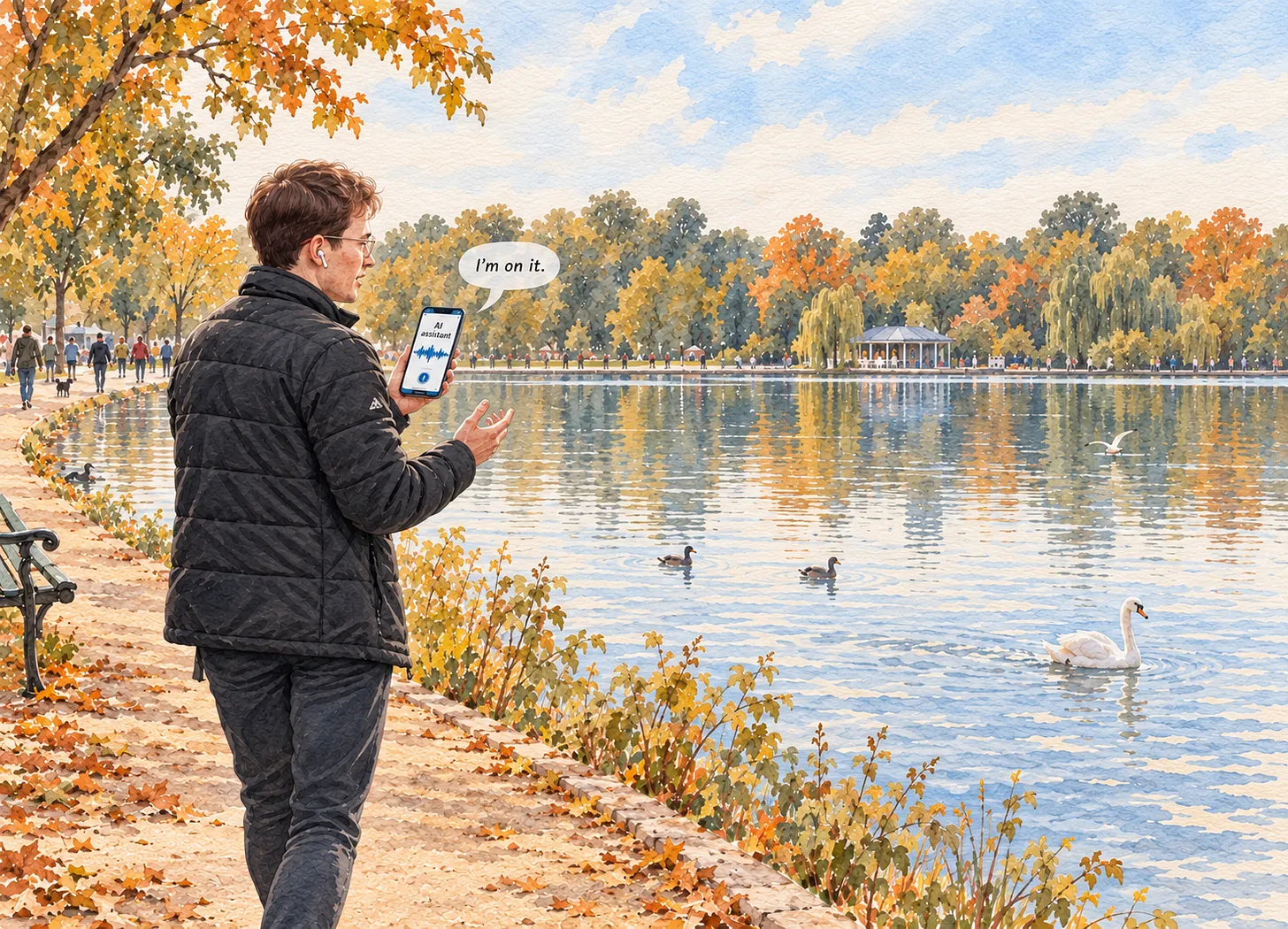
My voice assistant’s rendering of our walk.
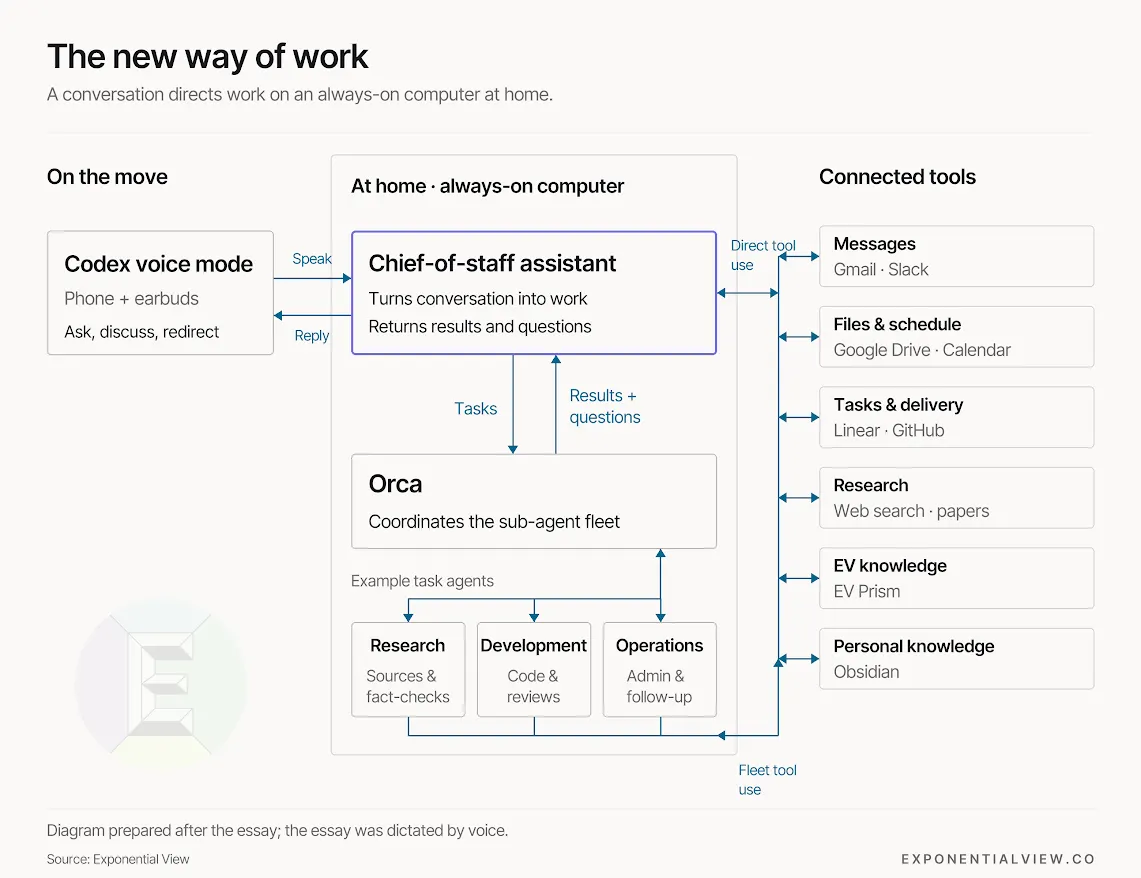
My assistant now has an extraordinary range of tools in its workshop (ChatGPT calls them plugins), including my calendar, Google Drive, Granola (included in our member perks!), and Slack. It can also access almost every tool I use at work.
The agent briefed me in detail. As it talked me through the list, I interjected: reply to that email; research the best model to run on our Mac Studio. It carried out each task, then picked up where we’d left off. A conversation replaced my usual routine of opening apps and piecing together what I needed to do that day.
I should clarify that a bit more is going on behind the scenes. Whenever I interject and ask my assistant to do a task, it doesn’t actually do it; it delegates to sub-agents running on my computer in Amsterdam via Orca. Here, the sub-agents have the space to build models, access my knowledge base and talk to each other, allowing for more complicated tasks to be done.
This gives more demanding tasks the time and focused attention they need while I move on to other matters. One example was fact-checking a recent post we published. My assistant delegated it to a sub-agent, who recruited three more: one to check claims against the links in the post, and two to check the math and how our models were set up. The completed fact-check, including suggested wording changes, was then emailed to another team member for review.
In the meantime, I had already moved on to talking through questions holding up development of EV Prism, our research and editorial platform. My assistant created more tasks for other sub-agents. I felt like Tony Stark flying along the sidewalk (except without a really cool iron suit).
The new division of labor
That is the division of labor I’m beginning to experience. I supply the purpose and judgment; the assistant organizes that work (what Azeem has previously called the chief-of-staff model), and the sub-agents handle more of the work that follows.
There are still limits, of course. Mostly anything visual. I can edit an essay by hearing it read aloud, but sometimes I need to see the paragraphs. Charts and layouts also benefit from being seen. Yet needing a visual reference doesn’t necessarily mean going back to the laptop. Meta’s smart glasses already put messages, directions, captions and AI responses into a small display in the lens.
We might not be far from opening a Google Doc on smart glasses. But in the meantime, I could still occasionally stop, sit, and whip out my phone when needed.
Even with these limits, I’ve seen a few clear benefits to this new way of working; first, I get more done. Before voice, when I had a thought or idea, I faced friction in making it real: I’d have to sit down at a computer, open an app, and type a message. Now I just need to say a sentence to my assistant.
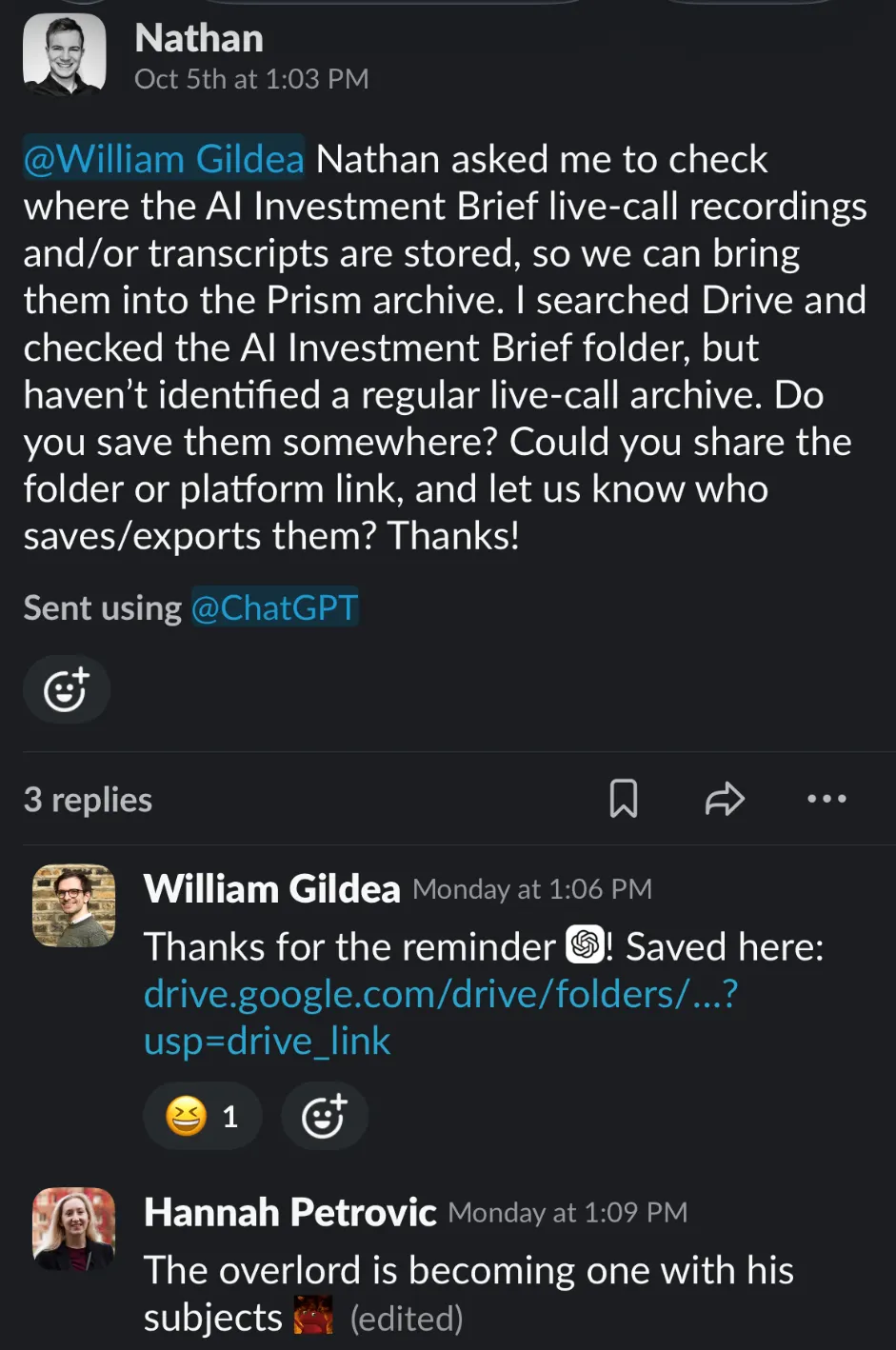
My agent requesting some help from the team
Second, I walk a lot more. Most people think the defining activity of knowledge work is thinking; personally, I think it has been sitting. And at great health cost, sitting at work is associated with a 16% higher risk of dying. We treat movement as something to fit around work: a walk before the day begins; a spin class after it ends. My week made me question why the working day must exclude so much. A desk is useful for reading, comparing and manipulating information. It need not be the default setting for every act of judgment.
I will still use my laptop. But I no longer assume that useful work begins by opening it.
For instance, I dictated this essay to my assistant while I walked around Hyde Park. 10,000 steps a day have never been easier.
Interesting Fabric note! Want to discuss it?
L
Luca
traduci in italiano:
I live in Amsterdam, and I travel to London every couple of months for some quality in-person time with the EV crew. When I arrived at my hotel on Monday, I realized that I had left my laptop at home.
A year ago, I would’ve felt completely lost without my laptop. If you do office work, you’ll probably relate. For decades, office work has revolved around computers: Slack, Word docs, Excel models, all created with the idea that I’ll be sitting at my desk, typing. That assumption is one of the fictions we built our lives around.
This week, without my laptop around, I found that fiction loosening, and now I believe it will eventually disappear because of how I use AI agents.
I did most of my work this week by chatting to ChatGPT on my phone. So I’m not replacing desk work with squinting at tiny text or craning my neck over a screen, but with talking and having the work talked back to me.
This is thanks to OpenAI’s July release of GPT-Live, which lets you direct agents by voice. I thought it deserved more attention then. It feels a little like talking to Jarvis, Iron Man’s AI assistant. And like Jarvis, it can put your workshop to work (for now, that workshop is mostly digital).
Leaving my laptop behind started a real-life experiment to see how much of my day-to-day work I could get done through my voice assistant.
I want to share more about my setup and what I found during this week of working only with my voice.
London calling
If you went by me as I walked around Hyde Park, you’d probably think I was on a phone call. That’s unless you overheard how demanding I was of whoever was on the other end. “Check Slack, catch me up on what happened over the weekend, and tell me what needs my attention.”
My voice assistant’s rendering of our walk.
My assistant now has an extraordinary range of tools in its workshop (ChatGPT calls them plugins), including my calendar, Google Drive, Granola (included in our member perks!), and Slack. It can also access almost every tool I use at work.
The agent briefed me in detail. As it talked me through the list, I interjected: reply to that email; research the best model to run on our Mac Studio. It carried out each task, then picked up where we’d left off. A conversation replaced my usual routine of opening apps and piecing together what I needed to do that day.
I should clarify that a bit more is going on behind the scenes. Whenever I interject and ask my assistant to do a task, it doesn’t actually do it; it delegates to sub-agents running on my computer in Amsterdam via Orca. Here, the sub-agents have the space to build models, access my knowledge base and talk to each other, allowing for more complicated tasks to be done.
This gives more demanding tasks the time and focused attention they need while I move on to other matters. One example was fact-checking a recent post we published. My assistant delegated it to a sub-agent, who recruited three more: one to check claims against the links in the post, and two to check the math and how our models were set up. The completed fact-check, including suggested wording changes, was then emailed to another team member for review.
In the meantime, I had already moved on to talking through questions holding up development of EV Prism, our research and editorial platform. My assistant created more tasks for other sub-agents. I felt like Tony Stark flying along the sidewalk (except without a really cool iron suit).
The new division of labor
That is the division of labor I’m beginning to experience. I supply the purpose and judgment; the assistant organizes that work (what Azeem has previously called the chief-of-staff model), and the sub-agents handle more of the work that follows.
There are still limits, of course. Mostly anything visual. I can edit an essay by hearing it read aloud, but sometimes I need to see the paragraphs. Charts and layouts also benefit from being seen. Yet needing a visual reference doesn’t necessarily mean going back to the laptop. Meta’s smart glasses already put messages, directions, captions and AI responses into a small display in the lens.
We might not be far from opening a Google Doc on smart glasses. But in the meantime, I could still occasionally stop, sit, and whip out my phone when needed.
Even with these limits, I’ve seen a few clear benefits to this new way of working; first, I get more done. Before voice, when I had a thought or idea, I faced friction in making it real: I’d have to sit down at a computer, open an app, and type a message. Now I just need to say a sentence to my assistant.
My agent requesting some help from the team
Second, I walk a lot more. Most people think the defining activity of knowledge work is thinking; personally, I think it has been sitting. And at great health cost, sitting at work is associated with a 16% higher risk of dying. We treat movement as something to fit around work: a walk before the day begins; a spin class after it ends. My week made me question why the working day must exclude so much. A desk is useful for reading, comparing and manipulating information. It need not be the default setting for every act of judgment.
I will still use my laptop. But I no longer assume that useful work begins by opening it.
For instance, I dictated this essay to my assistant while I walked around Hyde Park. 10,000 steps a day have never been easier.
∙
Turn on push notifications
Feel free to step away from the chat. We will notify you as soon as Fabric assistant responds.
Turn on
Claude
Vivo ad Amsterdam e ogni paio di mesi viaggio a Londra per passare del tempo di qualità di persona con il team di EV. Quando lunedì sono arrivato in hotel, mi sono accorto di aver lasciato il portatile a casa.
Un anno fa, senza il portatile mi sarei sentito completamente perso. Se lavori in ufficio, probabilmente capisci cosa intendo. Da decenni il lavoro d’ufficio ruota attorno ai computer: Slack, documenti Word, modelli Excel, tutti pensati partendo dall’idea che io sia seduto alla scrivania a digitare. È una delle finzioni su cui abbiamo costruito le nostre vite.
Questa settimana, senza il portatile, ho visto quella finzione cominciare a sgretolarsi. Ora credo che finirà per scomparire, grazie al modo in cui uso gli agenti AI.
Questa settimana ho svolto gran parte del mio lavoro conversando con ChatGPT sul telefono. Non sto quindi sostituendo il lavoro alla scrivania con lo sforzo di leggere testi minuscoli o di stare curvo su uno schermo, ma con il dialogo: parlo e mi faccio raccontare il lavoro.
È possibile grazie a GPT-Live, lanciato da OpenAI a luglio, che permette di impartire istruzioni agli agenti con la voce. All’epoca pensavo che meritasse più attenzione. È un po’ come parlare con Jarvis, l’assistente AI di Iron Man. E come Jarvis, può mettere al lavoro la tua officina, anche se per ora quell’officina è soprattutto digitale.
Lasciare a casa il portatile ha dato il via a un esperimento concreto: capire quanto del mio lavoro quotidiano potessi svolgere tramite l’assistente vocale.
Voglio raccontare meglio come ho organizzato il sistema e cosa ho scoperto durante questa settimana in cui ho lavorato solo con la voce.
Londra chiama
Se mi avessi visto camminare per Hyde Park, probabilmente avresti pensato che stessi telefonando. A meno che tu non avessi sentito quanto fossi esigente con la persona dall’altra parte: «Controlla Slack, aggiornami su quello che è successo nel fine settimana e dimmi a cosa devo prestare attenzione».
Il resoconto del nostro giro da parte del mio assistente vocale.
Ora il mio assistente ha a disposizione un’incredibile varietà di strumenti nella sua officina, quelli che ChatGPT chiama plugin. Ci sono il mio calendario, Google Drive, Granola (incluso tra i vantaggi per i membri!) e Slack. Può anche accedere a quasi tutti gli strumenti che uso al lavoro.
L’agente mi ha aggiornato in dettaglio. Mentre mi illustrava l’elenco, intervenivo con nuove richieste: rispondi a quell’email; cerca qual è il modello migliore da eseguire sul nostro Mac Studio. Portava a termine ogni attività, poi riprendeva da dove ci eravamo fermati. Una conversazione ha sostituito la mia solita routine: aprire le app e ricostruire, un pezzo alla volta, cosa dovevo fare durante la giornata.
Devo precisare che dietro le quinte succede qualcosa di più. Quando intervengo e chiedo al mio assistente di svolgere un’attività, non è lui a eseguirla: la delega a sottoagenti che girano sul mio computer ad Amsterdam tramite Orca. Lì, i sottoagenti hanno lo spazio necessario per creare modelli, accedere alla mia base di conoscenze e comunicare tra loro, così da portare a termine attività più complesse.
In questo modo, le attività più impegnative ricevono il tempo e l’attenzione concentrata di cui hanno bisogno, mentre io passo ad altro. Un esempio è stato il controllo dei fatti di un post pubblicato di recente. Il mio assistente ha delegato il compito a un sottoagente, che ne ha coinvolti altri tre: uno ha verificato le affermazioni confrontandole con i link presenti nel post; gli altri due hanno controllato i calcoli e la configurazione dei nostri modelli. Una volta completato il controllo, con le modifiche suggerite al testo, il risultato è stato inviato via email a un altro membro del team per la revisione.
Nel frattempo, ero già passato a discutere alcune questioni che stavano rallentando lo sviluppo di EV Prism, la nostra piattaforma di ricerca e pubblicazione editoriale. Il mio assistente ha creato altre attività da affidare ad altri sottoagenti. Mi sentivo come Tony Stark che sfreccia sul marciapiede, solo senza una fantastica armatura di ferro.
La nuova divisione del lavoro
È questa la divisione del lavoro che sto cominciando a sperimentare. Io stabilisco lo scopo e applico il mio giudizio; l’assistente organizza il lavoro, secondo quello che Azeem ha già definito il «modello del capo di gabinetto», e i sottoagenti si occupano di gran parte delle attività successive.
Ci sono ancora dei limiti, naturalmente. Soprattutto per tutto ciò che è visivo. Posso correggere un saggio ascoltandolo letto ad alta voce, ma a volte ho bisogno di vedere i paragrafi. Anche grafici e impaginazioni si valutano meglio guardandoli. Avere bisogno di un riferimento visivo, però, non significa necessariamente dover tornare al portatile. Gli occhiali intelligenti di Meta mostrano già messaggi, indicazioni, didascalie e risposte dell’AI su un piccolo display nella lente.
Forse non siamo lontani dal poter aprire un documento Google sugli occhiali intelligenti. Nel frattempo, posso comunque fermarmi ogni tanto, sedermi e tirare fuori il telefono quando serve.
Anche con questi limiti, ho notato alcuni vantaggi evidenti di questo nuovo modo di lavorare. Il primo è che riesco a fare di più. Prima, quando mi veniva un’idea o un pensiero, trasformarli in qualcosa di concreto richiedeva uno sforzo: dovevo sedermi al computer, aprire un’app e digitare un messaggio. Ora mi basta dire una frase al mio assistente.
Il mio agente chiede aiuto al team.
Il secondo vantaggio è che cammino molto di più. Molti pensano che l’attività che definisce il lavoro intellettuale sia pensare; personalmente, credo che sia sempre stata stare seduti. E a caro prezzo per la salute: stare seduti al lavoro è associato a un rischio di mortalità più alto del 16%. Consideriamo il movimento qualcosa da infilare intorno al lavoro: una passeggiata prima di iniziare la giornata, una lezione di spinning quando è finita. Questa settimana mi ha fatto chiedere perché la giornata lavorativa debba escludere così tanto movimento. Una scrivania è utile per leggere, confrontare e manipolare le informazioni. Non deve essere il luogo predefinito per ogni attività che richiede giudizio.
Continuerò a usare il portatile. Ma non do più per scontato che il lavoro utile inizi aprendolo.
Per esempio, ho dettato questo saggio al mio assistente mentre camminavo per Hyde Park. Non è mai stato così facile fare 10.000 passi al giorno.
∙
∙